Pristine Javascript
Version 0.1.4
Reduce nesting with guard clauses
Reduce nesting with helper functions
Declarative Programming Pt 1: Iteration
forEach is bad; use functional array functions
More functional array functions
Creating a deep copy with `map`
Declarative Programming Pt 2: Keywords `let` and `var` are Bad; Use `const` Instead
Creating variables is bad; don’t be afraid to inline.
Using helper functions and early returns to prevent reassignment
The use of ternary expressions
Declarative Programming Pt 3: Mutation and Side Effects are Bad (If you Return)
Splitting your function into a command and query
In-place XOR out-of-place functions
Helper functions help again: the bodies of conditionals
Helper functions help again: the Hub Pattern
DRY: repeating yourself is bad
Functions with the word “and” in their name are bad
Else-if is bad; use switch statements
Switch statements are bad; use dictionaries
Remove unnecessary if-statements
Functions function with more than 2 arguments are bad
Functions with plural arguments should be plural
Don’t unit-test functions with side effects.
Black-box vs white-box testing
String concatenation with + is bad
Declare variables as close as possible to where you use them
But if a variable is used repeatedly, instantiate it over the entire context it is relevant to
Don’t declare a variable without assigning a value to it
Don’t declare variables which don’t do anything
Addendums: Other Good and Bad Things
Long if-statement conditions are bad
Isolation or responsibility: functions should not have to use variables they don’t depend on
References And Further Reading
The purpose of this guide is to discuss some basic principles of writing Javascript code, and hopefully, root out a wide variety of poor practices plaguing software development.
This guide is intended for beginners, but I have seen many senior engineers violate these rules, so really, this guide is for everybody.
Most of this guide is not new insights. 80% of the advice is well-worn, battle-tested, established wisdom. Not everybody knows this advice however, so it is worth compiling common mistakes here, as a kind of crash course.
The other 20% of the advice is a combination of personal preference and new insight, but that’s also the advice most likely to be wrong. Use your critical thinking skills.
This guide is opinionated. I’ll tell you what I personally consider good and bad code, and make some strong prescriptions. But it’s not illegal for you to disagree. But I’ll make strong prescriptions.
Although all of the examples are Javascript, and some languages lend themselves better than others to the principles I will describe, my hope is that readers of this guide can find advice to improve their programming in any language.
The rules are often contradictory. In the end, there are no true rules of software development. Know the best practices, but in the end you will have to use your judgment based on the situation.
This guide moves fast. I won’t dwell too long on any given example before moving to the next example. If you need to stop and re-read the same example multiple times, that is understandable.
If it were up to me, this guide would include every possible piece of advice for writing beautiful software. Of course, that’s not possible, and anyway this guide is meant for quick consumption.
Good code respects both the writer and the reader. But since most code will spend at least 10x more time being read than being written, most code should put 10x more effort into respecting the reader than respecting the writer. Ultimately, however, the two things are the same.
It’s a truism, to the point of being a platitude, that code should be simple. However many caveats people want to add to this statement, I still fundamentally believe that this is the case.
In engineering, the fewer parts there are to a machine, the less likely it is for a part to break. In software engineering, this means in effect, that “more code is bad”. Of course, there are times when it is necessary to add code, but it should be weighed against the cost, for all code has to be maintained.
If you have two possible implementations, one implementation that requires less code, and another that requires more code, then our first assumption should be that the implementation requiring less code is better, provided that both accomplish the task equally well.
In this guide, I’ll use the term “declarative programming” a few times. Other people use different terms for it, such as “procedural programming”, depending on how they define their terms. Other people use the term to mean something different than what I mean. I use the word “declarative” because I can’t think of a better word, but my use of the word isn’t canonical. So for the purpose of this guide, it’s worth taking a bit of time to define what I personally mean by declarative code.
If object-oriented programming could be defined by a single keyword, it would be the word `this`. It is always assigning and mutating class-scoped variables, like this.
constructor(timeSeries) {
this.timeSeries = timeSeries;
}
If functional programming could be defined by a single keyword, it would be `return`. In the functional paradigm, functions have a return on the first line of their implementation, and the rest of their implementation is articulating the details of exactly what is returned. Don’t worry too much about the specifics of this function, just compare it to other approaches:
function sumOfSquaresOfEvens(numbers) {
return numbers
.filter(num => num % 2 === 0) // Filter even numbers
.map(num => num * num) // Map each number to its square
.reduce((acc, curr) => acc + curr, 0); // Reduce to sum the squares
}
If declarative programming could be defined by a single keyword, it would be `const`. Declarative functions are effectively functional, except with a few notable (mostly stylistic) differences.
function sumOfSquaresOfEvens(numbers) {
const evenNumbers = numbers.filter(num => num % 2 === 0);
const squares = evenNumbers.map(num => num * num);
const sumOfSquares = squares.reduce((acc, curr) => acc + curr, 0);
return sumOfSquares;
Unlike the strictest interpretations of functional programming, declarative programming is not opposed to declaring and instantiating variables. The declarative approach has hoisted “up” the logic to above the return statement, but it’s the same logic. I argue that the variables, by giving names to the steps, provide valuable information to the reader.
The fifth line of the Python manifesto says, “Flat is better than nested.” That’s for Python, not Javascript, but still, if you ask me that’s a pretty good fifth line to a manifesto.
I am what is known as a “never-nester”. That means that I can tolerate one, maybe two levels of nesting within a function, but anything more than that makes me cringe.
Though I am deeply devoted to the premise that nesting is bad, not all people will be immediately convinced. Therefore, it is worthwhile to lay out my reasons.
Humans read things in succession, one after another. Computers may prefer to read in a non-linear manner, but we are not computers. We read texts sentence by sentence, line by line, chunk by chunk. You may prefer to jump around and read things out of order, but that is still a succession.
The cognitive complexity of a chunk of text is defined by the following formula:
Cognitive Complexity = Context Complexity + Chunk Complexity
Where "context" refers to what the reader is burdened with remembering from the chunks that they previously read.
Every instance of nesting introduces one more unit of context. If a line of code is 5-levels of indentation deep, then that is 5 units of context which the reader must have in their head for the duration of the code block.
That may not sound like a lot, but that is a distraction for the cognitive work of understanding what each line in the block is trying to do on its own (the chunk complexity).
If a code block is opened, then it will need to be closed at some point. That means the reader will have to think about it twice: once when the code block is opened, and again when the code block is closed. An open curly brace implies an ask from the reader: there is something hanging, that they will have to remember again a little while down.
It’s far better to handle things successively, as soon as they come up. This approach is purely chronological and therefore less load on the reader.
Sometimes when I see a closing curly brace, often followed by an “else”, I’ll feel like I’m being woken up from a nap. “What is this? Where am I? I guess I was in an if-statement this whole time? Oh yeah.”
for (let i = 0; i < items.length; i++) {
for (let i = 0; i < 13; i++) {
if (items.result) {
doSomething1();
doSomething2();
doSomething3();
doSomething4();
doSomething5();
doSomething6();
doSomething7();
doSomething8();
doSomething9();
doSomething10();
doSomething11();
doSomething12();
doSomething13();
doSomething14();
doSomething15();
doSomething16();
doSomething17();
doSomething18();
doSomething19();
doSomething20();
} else {
// sorry, what is this?
doSomething21();
}
}
}
Similar to when you need to re-read something a page back in a book, when I get to the 20th to 21st doSomething, I had to backtrack to remind myself what the if-condition was in the first place.
What is a simple way to reduce nesting in this function?
function generateIfEven(n) {
if (n % 2 === 0) {
let result = 0;
for (let i = 1; i <= n; i++) {
result += i;
}
return result;
} else {
// what is this section doing?
return null;
}
}
Simply reversing the order of the if-statement does the trick. In the following example, the first if-statement is known as a guard clause. It’s capturing an edge-case with an early return. As a rule, conditionals should lead with whichever outcome leads us to doing less work.
function generateIfEven(n) {
if (n % 2 !== 0) {
return null;
}
let result = 0;
for (let i = 1; i <= n; i++) {
result += i;
}
return result;
}
Okay, that toy example doesn’t have much benefit. But the benefits of guard clauses are cumulative. To see the benefit of this approach, let’s turn our attention to code which is heavily nested.
function readCrewBasicsRow(crewBasicsRow, movies) {
const directors = {};
// FIRST if-statement
if (crewBasicsRow !== '') {
const rowContents = crewBasicsRow.split('\t')
// SECOND if-statement
if (rowContents[1] !== '\N') {
// THIRD if-statement
if (movies[rowContents[0]]) {
const directorsRaw = rowContents[1].split(',')
directorsRaw.forEach((director) => {
doSomething();
});
}
}
}
return directors;
}
Corresponding to each if-statement, there is some condition we want to check. We’re trying to ensure that some condition is met before we proceed. If each condition is satisfied, we call that the “happy path”: the conditions which lead to some action being performed. In the first if-statement, if crewBasicsRow is non-empty, that’s part of the happy path. If it is empty, that’s an unhappy path, so to speak.
Each check is essentially accounting for some unhappy path, mostly edge cases where values are empty. Our function needs to handle many unhappy paths. Let’s see how we can do that in a way that avoids nesting.
function readCrewBasicsRow(crewBasicsRow, movies) {
const directors = {};
// FIRST guard clause
if (crewBasicsRow === '') {
return directors;
}
const rowContents = crewBasicsRow.split('\t')
// SECOND guard clause
if (rowContents[1] === '\N') {
return directors;
}
// THIRD guard clause
if (!movies[rowContents[0]]) {
return directors;
}
const directorsRaw = rowContents[1].split(',');
directorsRaw.forEach((director) => {
doSomething();
});
return directors;
}
This does the same logic as the first example, but with much less indenting. All by putting the unhappy path in the body of the if-statements, rather than the happy path. When the reader skims this second example, it's trivial for them to tease out, "Ok, there are 3 unhappy conditions. This function checks each one, then performs the operation."
The sequence flows like the brain thinks. The basic pattern is:
if (unhappy_condition) {
return;
}
doHappyCondition()
For functions that expect a return value, this return will be some simple or empty value, like an empty array.
For this exercise, we’re going to refactor a truly badly nested disaster.
function function1() {
item0.sublist.forEach((item1) => {
if (item1.isValid) {
item1.sublist.forEach((item2) => {
if (item2.isValid) {
item2.sublist.forEach((item3) => {
if (item3.isValid) {
item3.sublist.forEach((item4) => {
if (item4.isValid) {
executeAction(item4);
}
});
}
});
}
});
}
});
}
This is bad, but it isn’t complex. Helper functions help us refactor.
function function1() {
item0.sublist.forEach((item1) => {
if (item1.isValid) {
function2(item1.sublist);
}
});
}
function function2(sublist1) {
sublist1.forEach((item2) => {
if (item2.isValid) {
function3(item2.sublist);
}
});
}
function function3(sublist2) {
sublist2.forEach((item3) => {
if (item3.isValid) {
function4(item3.sublist);
}
});
}
function function4(sublist3) {
sublist3.forEach((item4) => {
if (item4.isValid) {
executeAction(item4);
}
});
}
You may notice that, in this organization, the loops are “pushed down” into helper functions, while the if statements are not. I did this intentionally, as a nod to an article by Mat Klad: “Push Ifs Up And Fors Down” (although his advice is a bit more sophisticated and specific). It doesn’t particularly matter in this example, but his advice can be beneficial in the case of data-intensive applications.
In formal education, you probably learned to write functions like this:
function fibonacci(n) {
if (n == 0) {
return 0;
} else if (n == 1) {
return 1;
} else {
return fibonacci(n - 1) + fibonacci(n - 2);
}
}
Such beauty, such elegance... such atrocious performance! The runtime of this function is O(2^n). The problem is that it re-computes the same value multiple times. For instance, we can significantly speed up performance just by checking for duplicates.
const sequence = { 1: 0, 2: 1 };
function fibonacci(n) {
if (sequence[n] != undefined) {
return sequence[n];
}
const result = fibonacci(n - 1) + fibonacci(n - 2);
sequence[n] = result;
return result;
}
You may notice that the "sequence" dictionary does not actually have to be a dictionary. Because the keys are integers, it could just as easily be an array, where the indices represent what is being checked (n), and the values represent the results.
Let’s convert the dictionary to a list. While we're at it, we can get rid of the recursion, and replace it with a loop. In computer science, all recursive operations can be written as loops, and vice versa.
function fibonacci(n) {
const sequence = [0, 1];
for (let i = 2; i < n; i++) {
sequence[i] = sequence[i - 1] + sequence[i - 2];
}
return sequence[n - 1];
}
This final solution is not even optimal. It is possible to do away with the `sequence` array altogether, but I’ll leave that as an exercise for the reader.
Either way, this is the best version so far. Recursion is one of those things celebrated in school but turns out to be bad in real life software development.
There are two main reasons loops are better. First, most languages have recursion limits. Although it won't arise in toy examples, real world data will elicit a stack overflow exception.
Second, recursion puts a burden on the reader to trace the weird, loopy logic into a mental model of what's going on. The reader may not even realize that the function is recursive, until they reach the line in the code with the recursive call, and manually identify it as such. As a coding principle, it is better to "front-load" information. Loops are easier to read, because they "declare their intention on the onset" in the header, and provide structure by indenting the body.
The drawback is that you need to implement the correct collection data structure in order to make the loop solution work. In this example, it's just an array, but in other cases, it could be a stack/queue/dictionary/etc.
Conventional for-loops are okay when you simply want to increment over a series of integers.
But in most cases, we want to iterate over a specific data structure, like in the following example.
function doubleNumbers(numbers) {
let doubledNumbers = [];
for (let i = 0; i < numbers.length; i++) {
doubledNumbers.push(numbers[i] * 2);
}
return doubledNumbers;
}
I would discourage this syntax. The better approach is to use a forEach loop.
function doubleNumbers(numbers) {
const doubledNumbers = [];
numbers.forEach(function(number) {
doubledNumbers.push(number * 2);
});
return doubledNumbers;
}
You may be wondering why this is actually better. Well, it comes back to the principle of front-loading information. The first two words in the forEach loop are “numbers.forEach”. This declares the intention on the onset: what are we doing? We’re iterative over the numbers array! By contrast, what are the first two words in the for-loop? They are “for let”. This communicates nothing, other than the fact that it is a loop.
The forEach loop is also more concise syntax. Though not necessarily recommended, it’s so concise that it can be written on a single line, which many will appreciate.
numbers.forEach((number) => { doubledNumbers.push(number * 2); });
Although some people might be more used to for-loops, forEach loops are actually more readable when you get used to them. For-loops force you to carry the overhead of the iterator, “i”. Moreover, in order to get the item in each iteration, the coder needs to index the array. The value “number” is more readable than “numbers[i]”.
Finally, although this may seem pedantic, forEach is a step towards a more functional programming approach, because “i” is technically a variable that undergoes mutation. The benefits of the functional approach will become more apparent in later sections.
In this context, when I refer to “functional array functions”, I’m referring to functions which can be called on arrays which have a return value.
For the example I gave in the last section, I was misleading you slightly. A forEach loop is not actually the best choice. Here is how you would rewrite it to use a map.
function doubleNumbers(numbers) {
const doubledNumbers = numbers.map(function(number) {
// this is the return for the inner lambda
// (it will not return out of doubledNumbers)
return number * 2;
});
// this is the return for doubleNumbers
return doubledNumbers;
}
In fact, we can do away with the doubledNumbers array altogether, and just return immediately.
function doubleNumbers(numbers) {
return numbers.map(function(number) {
return number * 2;
});
}
This function is now purely functional. It’s not doing any kind of variable reassignment or data mutation (or, if there is any, it’s happening behind the scenes, in the implementation of map).
I’ll never resist mentioning this: the solution can fit on a single line.
function doubleNumbers(numbers) {
return numbers.map((number) => number * 2);
}
I would also argue that the use of map is actually more descriptive. If “numbers.forEach” declares its intentions on the onset, then “numbers.map” really declares its intentions on the onset. “numbers.forEach” only indicates we are iterative over an array. “numbers.map” indicates more precisely that we are going to apply some transform on each item in the array and get the result.
In addition to map, there are many array functions which you should master. For each of the following, I will first give an example of how to do the operation with forEach, and then an example of improved code utilizing the array function tailored to that purpose.
Reduce
In the reduce function, you have an accumulator which is initialized to some value, and updated with every call to the lambda.
Using forEach:
let strings = ["Hello", " ", "world", "!"];
let concatenatedString = '';
strings.forEach(function(string) {
concatenatedString += string;
});
console.log(concatenatedString); // Output: "Hello world!"
Using reduce:
const strings = ["Hello", " ", "world", "!"];
const concatenatedString = strings.reduce(function(accumulator, currentValue) {
return accumulator + currentValue;
}, '');
console.log(concatenatedString); // Output: "Hello world!"
To linger on reduce, this function is useful in a surprising variety of situations. For example, suppose you are looking for the maximum value in an array.
const numbers = [50, 40, 34, 33, 93, 51, 2];
let concatenatedString = numbers.reduce(function(maxValue, number) {
return Math,max(maxValue, number);
}, 0);
console.log(concatenatedString); // Output: "Hello world!"
Every
Returns true if some condition is true for all elements in the list.
Using forEach:
let strings = ["apple", "banana", "grape", "kiwi"];
let allLongStrings = true;
strings.forEach(function(string) {
if (string.length <= 3) {
allLongStrings = false;
}
});
console.log(allLongStrings); // Output: true
Using every:
const strings = ["apple", "banana", "grape", "kiwi"];
const allLongStrings = strings.every(function(string) {
return string.length > 3;
});
console.log(allLongStrings); // Output: true
Some
Returns true if some condition is true for at least one element in the list.
Using forEach:
let strings = ["apple", "banana", "grape", "kiwi"];
let hasO = false;
strings.forEach(function(string) {
if (string.includes('o')) {
hasO = true;
}
});
console.log(hasO); // Output: true
Using some:
const strings = ["apple", "banana", "grape", "kiwi"];
const hasO = strings.some(function(string) {
return string.includes('o');
});
console.log(hasO); // Output: true
Filter
Returns an array with has filtered out all items in the original array which don’t match some condition.
Using forEach:
let strings = ["apple", "banana", "grape", "kiwi"];
let shortStrings = [];
strings.forEach(function(string) {
if (string.length <= 4) {
shortStrings.push(string);
}
});
console.log(shortStrings); // Output: ["kiwi"]
Using filter:
let strings = ["apple", "banana", "grape", "kiwi"];
let shortStrings = strings.filter(function(string) {
return string.length <= 4;
});
console.log(shortStrings); // Output: ["kiwi"]
Find
Returns the item in the array which matches some condition.
Using forEach:
let strings = ["apple", "banana", "grape", "kiwi"];
let foundString = null;
strings.forEach(function(string) {
if (string.startsWith('b')) {
foundString = string;
return; // Breaks the loop early once the first match is found
}
});
console.log(foundString); // Output: "banana"
Using find:
const strings = ["apple", "banana", "grape", "kiwi"];
const foundString = strings.find(function(string) {
return string.startsWith('b');
});
console.log(foundString); // Output: "banana"
Memorize all of the array functions in your programming language of choice. Knowing when and how to utilize each one is the hallmark of a skilled coder.
For some period of time, challenge yourself to only use the functions in this list (including map) for iteration, in place of `for` or `while`. Over time, you will probably find that you prefer it.
One detail I’ve added to the above examples is that the code which uses the proper array function always declares variables with “const”. I did that because I can (see the next chapter).
One of the advantages of pure functions is that they allow you to make a deep copy of an array, persisting the old array should you want it.
Take for example, the following forEach:
const listOfObjects = [
{ id: 1, name: "Alice" },
{ id: 2, name: "Bob" },
{ id: 3, name: "Charlie" }
];
listOfObjects.forEach(obj => {
const status = obj.id % 2 === 0 ? "even" : "odd";
listOfObjects.status = status;
});
There’s nothing necessarily wrong with this, if this is what we’re trying to do. But what if we want to make a whole new array, a deep copy but with the alteration?
const listOfObjects = [
{ id: 1, name: "Alice" },
{ id: 2, name: "Bob" },
{ id: 3, name: "Charlie" }
];
// map creates a copy of the array
const updatedList = listOfObjects.map(obj => {
const status = obj.id % 2 === 0 ? "even" : "odd";
// the spread operator makes a copy of each object in the array
return {
...obj,
// includes whatever alteration you want to make
status: status
};
});
Done.
We are now entering the functional programming paradigm, in which we are not allowed to reassign variables to new values. When I refer to “declarative programming”, I mean this blend of styles, where all variables are const, we rarely use for/while loops, and all functions are pure.
Maybe you’re not quite sold on this vision of programming yet. I only ask that you try it, and probably some day you will be a believer.
Be advised: const and not, strictly speaking, constants; if the const stores an object or array, you can modify the values stored inside of it. You can update the values of dictionaries, and push items to arrays.
What const does do, however, is prevent your variable from being reassigned. This is, in itself, highly valuable. As per the declarative style, it is recommended to re-write your code to prevent reassignment. This allows you to use `const` in most if not all cases.
On the rare cases that you decide you’ll want to reassign a variable for some reason, then `let` will actually mean something, because the keyword will represent a break from the standard. This distinction will mean that your code declares its intention on the onset. The person reading your code will know, when the variable is first created, whether to be on the lookout for its future reassignment.
const toNeverBeReassigned = ["hello", "hola", "bonjour"];
// this will be reassigned later! Check for the "=" later
let toBeReassigned = ["ball", "cat", "candle"];
// later:
toBeReassigned = replacementStrings
An added benefit of const is that it provides a (very soft) form of type protection, because if you’re writing standard Javascript, there is otherwise nothing preventing you from assigning a variable to a different type.
let myObj = jsonObj.prop1; // a JS object
myObj = myObj.nameCode; // a string!
myObj = parseInt(myObj); // this is a number!
callOnObject(myObj); // this will fail, because it expects an object
This function reassigns the value of “value” a lot.
function processDataValue(data) {
// Get json string
let value = value["info"]["description"];
// Split string
value = value.split(":");
// Get subsection
value = value[1];
// Get uppercase
value = value.toUpperCase();
// Trim subsection
value = value.trim();
return value;
}
I dislike how this function uses the keyword “let” on line 2. Let’s change it to “const”.
function processData(data) {
// Get json string
const jsonString = data["info"]["description"];
// Split string
const splitString = jsonString.split(":");
// Get subsection
const subsection = splitString[1];
// Get uppercase
const uppercaseSubsection = subsection.toUpperCase();
// Trim subsection
const trimmedSubsection = uppercaseSubsection.trim();
return trimmedSubsection;
}
Now, we aren’t doing any reassignment. Whenever we might want to reassign a variable, we are instead creating a whole new variable, giving it a different name, and assigning the new value to that.
A major advantage of the modified code is the fact that it’s self-documenting. The fact that we had to create new variables is good, because it forced us to give descriptive, unique names to all of the variables. Now that we’ve done that, we don’t need the comments any more.
function processData(data) {
const jsonString = data["info"]["description"];
const splitString = jsonString.split(":");
const subsection = splitString[1];
const uppercaseSubsection = subsection.toUpperCase();
const trimmedSubsection = uppercaseSubsection.trim();
return trimmedSubsection;
}
We’ve come a long way, essentially cutting the number of lines of code in half (yes, comments count as lines of code! more on that later) without sacrificing any information.
Suppose this was a much larger function. We can reuse any of these variables elsewhere, safe in the knowledge that whatever it was originally assigned as, that’s what it is still. We don’t need to check whether the value has been reassigned at some place we didn’t notice.
Furthermore, when we plug these variables in at some other location, the name has self-documenting power still. We don’t need to remember to write an extra comment to remind people of what it is.
You might complain that adding a bunch of new variables, each with a new name, is making the code more verbose. And you’d be right. However, if that is the case, it’s a smell that your code was verbose in the first place.
We can get rid of variables which aren't adding needed information by inlining.
function processData(data) {
return data["info"]["description"].split(":")[1].toUpperCase().trim();
}
Is this better? It’s a bit subjective. Every function must find a tradeoff between readability/declarative style/creating variables, vs. brevity/functional style/returning early.
Here is a situation where it looks like we have to do assignment.
function processedCode(code, toAppend) {
const extractedCode = code.toString().substring(0, 3);
let result;
if (extractedCode.includes("1")) {
result = 101;
} else if (extractedCode.includes("2")) {
result = 202;
} else if (extractedCode.includes("3")) {
result = 303;
} else {
result = 000;
}
const parsedAppend = parseInt("1" + toAppend);
return result + parsedAppend;
}
For all the other variables, I was careful to use const. But result has to be mutable, there’s no other way, is there?
Here is how to fix it.
function processedCode(code, toAppend) {
const extractedCode = code.toString().substring(0, 3);
const result = processedCodeHelper(extractedCode)
const parsedAppend = parseInt("1" + toAppend);
return result + parsedAppend;
}
function processedCodeHelper(code) {
if (extractedCode.includes("1")) {
return 101;
} else if (extractedCode.includes("2")) {
return 202;
} else if (extractedCode.includes("3")) {
return 303;
} else {
return 000;
}
}
Once more, the practice of the early return to the rescue. As the system grows, the fact that we extracted logic into a helper function will also aid with code organization.
In some cases, early returns are enough. In the following example, we take a list of users, and we need to update the user list if the new user list is different than the old user list.
function updateUserList(oldUsers, newUsers) {
let shouldUpdateUsers = true;
if (oldUsers.length !== newUsers.length) {
shouldUpdateUsers = false;
}
// sort lists so we can compare them
oldUsers.sort();
newUsers.sort();
for (let i = 0; i < oldUsers.length; i++) {
if (oldUsers[i] !== newUsers[i]) {
shouldUpdateUsers = false;
}
}
if (shouldUpdateUsers) {
upsertNewUserGroup(newUsers);
}
}
Here’s how to rewrite it.
function updateUserList(oldUsers, newUsers) {
if (oldUsers.length !== newUsers.length) {
return;
}
// sort lists so we can compare them
oldUsers.sort();
newUsers.sort();
for (let i = 0; i < oldUsers.length; i++) {
if (oldUsers[i] !== newUsers[i]) {
return;
}
}
upsertNewUserGroup(newUsers);
}
We got rid of the shouldUpdateUsers variable altogether. Instead, we (similar to the advice in the chapter on nesting) simply return on the unhappy paths.
In the future, it may also be advisable to extract the array comparison logic into a helper function anyway, for the purpose of reuse.
We can also change the for-loop to use the “every” function instead. (Although this is one of the rare cases where the for-loop is not obviously worse, because we’re iterating over 2 lists at the same time.)
This code can be shortened.
let myObject;
if (argument1 != undefined) {
myObject = argument1;
} else {
myObject = placeholder;
}
This is a common pattern. According to the advice I just gave, we should extract this logic and put it into a helper function. However, this logic is so basic and short that creating a whole function for it seems silly.
The solution is to put this logic into a ternary expression, like so.
const myObject = argument1 != undefined ? argument1 : placeholder;
Let’s say our requirement is even more basic, and we just want to make sure that argument1 is truthy (eg, not null, undefined, not an empty string, not zero). Javascript constructs allow for this alternative syntax.
const myObject = argument1 || placeholder;
If a function is a query, it exists to ask a question. If a function is a command, it exists to perform some state change. I didn’t invent this terminology, but I’ve found it quite useful. Here is a table of the differences.
|
Category |
Query |
Command |
|
Return value |
Returns a value, no state change |
Usually doesn’t return a value, performs a state change |
|
Mutation and side effects |
No mutation or side effects |
Mutation and/or side effects |
|
Naming |
Should be named a noun phrase |
Should be named a verb phrase |
Another way to categorize functions is by purity.
To call a function “pure” doesn’t mean it’s good, and “impure” doesn’t mean bad. These terms are meant to communicate whether or not the function obeys the function programming style.
I will also use the term “quasi-pure” to refer to functions which can access, but not modify, state external to the function.
|
Function Kind |
Pure |
Quasi-pure |
Impure |
|
Query or command? |
Query |
Query |
Command |
|
Style |
Functional |
Declarative or object-oriented |
Object-oriented |
|
Randomness |
Deterministic |
Deterministic for as long as impure functions aren’t called |
Sometimes non-deterministic |
|
Unit testing |
Unit testing is very easy |
Unit testing is relatively easy |
Unit testing is difficult without spies |
|
Trivial example |
Static functions |
Getters |
Setters |
|
Dependency |
Only depend on input arguments |
May depend on, but not change, global state |
May depend on global state |
|
Calling other functions |
Can only call other pure functions |
Can call pure or other quasi-pure functions |
Can call any other functions |
Functions should either be comands or queries. Functions should not combine properties of the two. Doing so can create unexpected behavior, and lead to unmanageable systems.
What this means in practice is that if it looks like the purpose of a function is just to return value, then it should not be modifying the state of the system.
Here’s an example of a function which violates that principle.
getUserStatus(username) {
const index = this.onlineUsers.indexOf(username);
if (index !== -1) {
this.onlineUsers = this.onlineUsers.filter(user => user !== username);
return new UserStatus(username, "online");
} else {
return new UserStatus(username, "not found");
}
}
This function is doing two different things. It’s returning a UserStatus object, but it’s also modifying this.onlineUsers.
The behavior of this function is non-deterministic across successive calls, seen below.
let user = getUserStatus("Alice");
console.log(user.status); // prints "online"
user = getUserStatus("Alice");
console.log(user.status); // prints "not found"
This is confusing behavior. The user called getUserStatus because they wanted to get the user status. They may not know that the function modifies the state behind the scenes. So the second time they call the function, they get a different result, and they don’t know why.
Being able to replicate results is fundamental to debugging, and just about everything that programmers do. This function’s behavior on the first call cannot be replicated without rewinding time to the previous state of the program, which is a headache. Multiply this kind of behavior across many functions, and the result is a very non-replicable system.
As an aside, many standard array functions violate this principle, namely the functions “splice”, “pop”, and “unshift”. Perhaps these can be excused, because what these functions do is so simple, because the behavior of arrays is so well-understood, and because it’s the convention.
Example 1: extracting your queries
This function arguably doesn’t break the “commands XOR queries” rule, because it has no return value, but it gets dangerously close to the edge.
function updateObject(args) {
const object = getObjectFromDatabase()
object.summary = object.descriptions.reduce((summary, description) => {
// some code
}, "")
// 10-30 lines of a bunch of other actions
// which manipulate the object
writeObjectToDatabase(object)
}
This code can be hard to debug, because every time you call it, it results in changes to the database state. That’s why I like to extract as much logic as possible “out” of setters.
function updateObject() {
const object = getObjectFromDatabase()
const updatedObject = getUpdatedObject(args)
writeObjectToDatabase(updatedObject)
}
function getUpdatedObject(args) {
object.summary = object.descriptions.reduce((summary, description) => {
// some code
}, "")
// 10-30 lines of a bunch of other actions
// which manipulate the object
}
We want our “updateObject” function, a function with side effects (and therefore a command), to be as small as possible. Pure functions are safer to debug, and can be longer.
Example 2: extracting your commands
The function below violates the rule against mixing commands and queries.
function createCustomerInvoices(customers, spec) {
customers.forEach((customer) => {
const goodsSold = goodsSoldTo(customer, {
dateRange: spec.dateRange
});
const totalPriceOfGoods = goodsSold.reduce((sumCost, sale) => {
return sumCost + sale.price
});
const values = [
{ customerId: customer.id },
{ totalPrice: totalPriceOfGoods },
];
if (totalPriceOfGoods > spec.largeTransactionPrice) {
writeToLargeTransactions(values);
} else {
writeToSmallTransactions(values);
}
});
}
The “goodsSoldTo” function is a query. The function then performs some logic. Finally, the “writeToLargeTransactions” and “writeToSmallTransactions” are commands. They seem inherently tied to each other. But we can decouple them, by keeping the queries in this function, and putting the commands in another.
function createCustomerInvoices(customers, spec) {
const smallTransactions = [];
const largeTransactions = [];
customers.forEach((customer) => {
const goodsSold = goodsSoldTo(customer, {
dateRange: spec.dateRange
});
const totalPriceOfGoods = goodsSold.reduce((sumCost, sale) => {
return sumCost + sale.price
});
const values = [
{ customerId: customer.id },
{ totalPrice: totalPriceOfGoods },
];
if (totalPriceOfGoods > spec.largeTransactionPrice) {
largeTransactions.push(values);
} else {
smallTransactions.push(values);
}
return invoicesToCreate
});
return {
smallTransactions: smallTransactions,
largeTransactions: largeTransactions
};
}
function createCustomerInvoices(smallTransactions, largeTransactions) {
smallTransactions.forEach((transaction) => {
writeToSmallransaction(transaction)
});
largeTransactions.forEach((transaction) => {
writeToLargeTransaction(transaction)
});
}
Ultimately, we will need a collector to call both of them, feeding the output of one function as the input to another.
const invoices = createCustomerInvoices(customers, spec);
createCustomerInvoices(invoices.smallTransactions, invlices.largeTransactions);
But these are just 2 lines, so trivial to debug, resulting in cleaner code.
You may argue, “but isn’t this performance worse? Before, I was handling everything in one loop, but now, it’s a bunch of loops!” This is dead wrong, because it is often possible to utilize batching for better performance gains. Many libraries APIs support batch operations.
function createCustomerInvoices(smallTransactions, largeTransactions) {
writeSmallTransactionsbatch(smallTransactions);
writeLargeTransactionsbatch(largeTransactions);
}
Batching is often much faster for a few reasons.
“In-place” vs “out of place” is the same fundamental concept as commands vs queries, respectively, but extended to arguments.
A function is called “in-place” if it modifies data structure or object they are called on, or that are passed in as arguments.
I generally recommend out-of-place implementations, but there are reasons to create in-place functions, most notably for memory efficiency. Bust make sure that you distinguish which is which.
// IN-PLACE: this function reverses the array
function reverse(arr) {
for (let i = 0; i < arr.length / 2; i++) {
const temp = arr[i];
arr[i] = arr[arr.length - i - 1];
arr[arr.length - i - 1] = temp;
}
}
const arr = [1, 2, 3, 4, 5]
reverse(arr)
console.log(arr)
// OUT-OF-PLACE: this function creates a new array,
// a reversed version of the original, and returns it
function reversed(arr) {
const newArr = [];
for (let i = arr.length - 1; i >= 0; i--) {
newArr.push(arr[i]);
}
return newArr;
}
const arr2 = [1, 2, 3, 4, 5]
const reversedArr2 = reversed(arr);
console.log(arr2)
Notice that the function `reverse` is given a verb name, whereas the function `reversed` is an adjective. This is because the former acts on the passed-in list, whereas the ladder returns a new reversed list.
This book strays away from discussion of system architecture, so I won’t say everything I want to say about idempotence, except for a few words. “Idempotence” is a very fancy word which for our purposes essentially means that your commands should not be too tightly coupled with your queries. If I run the same command twice in a row, I should expect no change to the system, because the command has already been completed.
Comments themselves aren’t bad, necessarily. But comments are a code smell which indicate that something has gone wrong.
When I refer to comments, I’m not talking about documentation. Comments on public interfaces and APIs should be as detailed as the standards dictate. When talking about comments being a code smell, I mean annotation in-line with the code.
Let’s ask the question: what is the purpose of comments? I would answer like this: the purpose of comments is to explain aspects of the code which may be confusing to the reader. This means, in effect, that the majority of comments fall into one of the following 2 buckets:
We will begin by discussing type 1 (useless comments), before moving into type 2 (summary comments and comments on variables).
// initialize scores
const scores = initializeScores();
// set toBeUpdated to true
var toBeUpdated = true;
// create an alert
var alert = UserAlert.create();
// refresh this case's alert fields
case.refreshFields(["alert"]);
Don't clutter your functions with redundant, unnecessary comments, which describe facts that are perfectly clear to anyone who simply reads the code.
You may say, "well, what's the harm?" But the harm is real. From the perspective of maintainability, comments are code. They can become outdated. If there are changes to the code being described, then someone needs to remember to go back and update the comments. They often forget.
Furthermore, "more code is bad" principle applies to comments just as regular code. The more comments there are, the more likely that they contain errors. It is always possible the person writing the comment made a mistake. Aside from code reviews, there is no mechanism like unit tests to confirm that comments are correct.
Not quite as bad, many comments are simply poorly written, overcomplicating the matter and actually making the reader more confused than they would have otherwise been.
Personally, when I encounter new code which I am trying to understand, I often ignore comments on my first read-through. Only after putting in great effort to read the code, if I still don't understand it, then I might read the comments, and usually that doesn’t help. Simply put, the code is (or should be) more informative, because it contains the actual underlying logic.
One of the most common examples of this are comments which compensate for the fact that your function has become too long, unwieldy, and confusing. In the following function, observe each of the necessary comments.
function calculateAverageWordLength(sentence) {
// Extract sanitized words from sentence
const sanitizedSentence = sentence.replace(/[^\w\s]/g, '');
const wordsArray = sanitizedSentence.split(' ');
const trimmedWords = wordsArray.map(word => word.trim());
const nonEmptyWords = trimmedWords.filter(word => word.length > 0);
// Filter words
const filteredWords = nonEmptyWords.filter(word => word.length > 2);
const uniqueWords = [...new Set(filteredWords)];
const uncommonWords = uniqueWords.filter(word => word.length < 7);
// Apply transformations to words
const lowercaseWords = uncommonWords.map(word => word.toLowerCase());
const capitalizedWords = lowercaseWords.map(word => {
return word.charAt(0).toUpperCase() + word.slice(1);
});
const reversedWords = capitalizedWords.map(word => {
return word.split('').reverse().join('');
});
// Calculate average word length
const wordLengths = reversedWords.map(word => word.length);
const totalWordLength = wordLengths.reduce((acc, length) => acc + length, 0);
const totalWords = capitalizedWords.length;
const averageWordLength = totalWordLength / totalWords;
// Calculate rounded averages
const roundedAverage = Math.round(averageWordLength * 100) / 100;
const roundedToInteger = Math.round(averageWordLength);
return { roundedAverage, roundedToInteger };
}
This function has a big problem. That problem is: the function is too long! And you could realize that if you thought hard enough about the comments. The purpose of the comments in this function are to compensate for its length by breaking it out into sections, and note what each of the sections are doing. The comments serve our purpose. But now we know that the function has distinct sections. Let’s fix the length by moving each section into a different helper function.
function calculateAverageWordLength(sentence) {
// Extract sanitized words from sentence
const nonEmptyWords = extractSanitizedWordsFromSentence(sentence);
// Filter words
const uncommonWords = filteredWords(nonEmptyWords);
// Apply transformations to words
const reversedWords = transformedWords(uncommonWords);
// Calculate average word length
const averageWordLength = averageWordLengths(reversedWords);
// Calculate rounded averages
const roundedToInteger = calculateRoundedAverages(averageWordLength);
return roundedToInteger;
}
All we have done is taken the 6 comments from the original function and built a helper function around each. The helper functions are extractSanitizedWordsFromSentence, filteredWords, transformedWords, averageWordLengths, and calculateRoundedAverages.
I have not shown the implementations of all of the helper functions, because I feel it would take up too much space, and because you can probably guess what they contain. They each do the same thing as in the original function, but they return an array. As an example, I’ll show you the implementation of extractSanitizedWordsFromSentence.
function extractSanitizedWordsFromSentence(sentence) {
const sanitizedSentence = sentence.replace(/[^\w\s]/g, '');
const wordsArray = sanitizedSentence.split(' ');
const trimmedWords = wordsArray.map(word => word.trim());
const nonEmptyWords = trimmedWords.filter(word => word.length > 0);
return nonEmptyWords;
}
If we return to calculateAverageWordLength, we now find that the comments are redundant. All of the information in the comments is now contained in the names of the functions! This is the power of good function naming. I’ll delete the comments.
function calculateAverageWordLength(sentence) {
const nonEmptyWords = extractSanitizedWordsFromSentence(sentence);
const uncommonWords = filteredWords(nonEmptyWords);
const reversedWords = transformedWords(uncommonWords);
const averageWordLength = averageWordLengths(reversedWords);
const roundedToInteger = calculateRoundedAverages(averageWordLength);
return roundedToInteger;
}
In addition to grouping actions into functions, you should group variables into objects. These summary comments are bad.
// == BOARD DIMENSIONS == //
const boardX = 4000;
const boardY = 4000;
const screenX = 750;
const screenY = 750;
const xStart = 1000;
const yStart = 1000;
// == INFO DISPLAY == //
const textXOffset = 13;
const panelTop = screenY - 240;
const panelFont = 15;
const indicatorTriangleSize = 16;
And this is good.
const boardDimensions = {
boardX: 4000,
boardY: 4000,
screenX: 750,
screenY: 750,
xStart: 1000,
yStart: 1000
};
const infoDisplay = {
textXOffset: 13,
panelTop: boardDimensions.screenY - 240,
panelFont: 15,
indicatorTriangleSize: 16
};
With rare exceptions, comments on variables comment for the fact that the variable is poorly named. Observe how the comments are doing legwork for overly abbreviated or inaccurate variable names.
// gets average color of all balloons and finds a balloon
// which is sufficiently close to that color
function getValueFromBalloons(balloons, minSize, difference) {
// sort balloons by color
balloons = balloons.sort((b) => b.size);
// index of the first balloon larger than minSize
let bPtr = balloons.indexOf((b) => b.size >= minSize) - 1;
// get average balloon information from balloons below size threshold
const metadata = getBalloonMetadata(balloons.slice(0, bPtr));
// get average balloon color
const c = parseInt(metadata.getColorString());
// gets the first balloon whose color is similar enough to the average color
bPtr = balloons.indexOf((b) => {
// checks how similar the current balloon color is to the average color
return b.size >= minSize && minus(b.color, c) <= difference;
});
return bPtr;
}
At least these comments are relatively informative. But what if the comments were confusing or bad? It’s generally better if the code is self-documenting, so that I don’t have to trust someone else’s crazy comments.
We can, in effect, move all of these comments into the variable names.
function indexOfBalloonCloseToColorAverageFrom(
balloons, minSizeConsidered, minColorDifference) {
const sortedBalloons = balloons.sort((b) => b.size);
const sizeCutoffIdx = balloons.indexOf((b) => b.size >= minSizeConsidered);
const balloonsBelowSizeThreshold = sortedBalloons.slice(0, sizeCutoffIdx);
const balloonAverages = getBalloonAverages(balloonsBelowSizeThreshold);
const averageColor = parseInt(balloonAverages.getColorString());
const IdxOfBalloonCloseToAverage = balloons.indexOf((currentBalloon) => {
return b.size >= minSizeConsidered &&
colorDiff(currentBalloon.color, averageColor) <= minColorDifference
});
return IdxOfBalloonCloseToAverage;
}
There are more things I’d like to change about this function, but that’s a good start. This refactor also makes the code much more concise, for what that’s worth, which is a lot.
There are two kinds of comments which are good.
// This operation makes sure that we don't lose data before we
// pass it to the parser and interpolator
function strangeOperationResults(data) {
// Due to a bug in the third-party library we're using,
// we have to call this function twice with slightly different parameters
// to ensure the correct behavior.
const resultStrict = library.strangeOperation(data, { mode: 'strict' });
const resultLoose = library.strangeOperation(data, { mode: 'loose' });
// Warning: don't change this to call with 'dynamic' mode, because
// that will reformat the data in a way we can't work with
const finalResult = mergeResults(resultStrict, resultLoose);
return finalResult;
}
// Space out the items that are shown slightly to create a more
// visually pleasing effect
const itemsForSaleSpec = {
content: spec.itemsForSaleText,
// Due to a big in the KlockSlick library, we need to pass in 0
// as a string, because it will delete falsey values
formFieldItemsToDisplayStart: '0',
formFieldItemsToDisplayEnd: 5,
};
// The delay is not because of a runtime issue; this is a cheap way to
// simulate a visual effect
const numMillis = 50*000;
KlockSlick.displayPageContent(toDisplay).delayShow(numMillis);
These are good comments. But remember, every comment entails a failure, a failure to make your code self-documenting.
Ultimately, a function is too long when it becomes unreadable, not based on any specific number of lines of code. But here is a general gauge of how long functions should be.
|
Lines of Code |
Comments |
|
1-9 |
Good |
|
10-39 |
Sometimes still okay, but consider refactoring |
|
40+ |
Bad, refactor |
In your programming career, you may encounter a long sequence of conditions.
function updatePizzasbyState(similarPizzas, pizzaStateStr) {
if (pizzaStateStr === "orderPlaced") {
similarPizzas.forEach((currentPizza) => {
currentPizza.get(["operationData"]);
// 10-15 more lines of logic
});
} else if (pizzaStateStr === "prep") {
similarPizzas.forEach((currentPizza) => {
currentPizza.get(["operationData"]);
// 10-15 more lines of logic
});
} else if (pizzaStateStr === "baking") {
similarPizzas.forEach((currentPizza) => {
currentPizza.get(["operationData"]);
// 10-15 more lines of logic
});
} else if (pizzaStateStr === "delivery") {
similarPizzas.forEach((currentPizza) => {
currentPizza.get(["operationData"]);
// 10-15 more lines of logic
});
} else if (pizzaStateStr === "delivered") {
similarPizzas.forEach((currentPizza) => {
currentPizza.get(["operationData"]);
// 10-15 more lines of logic
});
} else {
similarPizzas.forEach((currentPizza) => {
currentPizza.get(["operationData"]);
// 10-15 more lines of logic
});
}
}
I’ve spared you from all of the custom logic, but lengthy operations can move this code into the hundreds of lines.
The solution is to extract all of the custom logic into individual helper functions.
function updatePizzasbyState(similarPizzas, pizzaStateStr) {
if (pizzaStateStr === "orderPlaced") {
updatePizzasAsOrderPlaced(similarPizzas);
} else if (pizzaStateStr === "prep") {
updatePizzasAsPrep(similarPizzas);
} else if (pizzaStateStr === "baking") {
updatePizzasAsBaking(similarPizzas);
} else if (pizzaStateStr === "delivery") {
updatePizzasAsDelivery(similarPizzas);
} else if (pizzaStateStr === "delivered") {
updatePizzasAsDelivered(similarPizzas);
} else {
handleUndocumentedStateUpdate(similarPizzas);
}
}
You saw this before in the previous section, but now the function is a manageable size.
When a function is getting long, you will want to look for distinct “blocks” of code which can be pulled out into helper functions. There are a few ways to identify them.
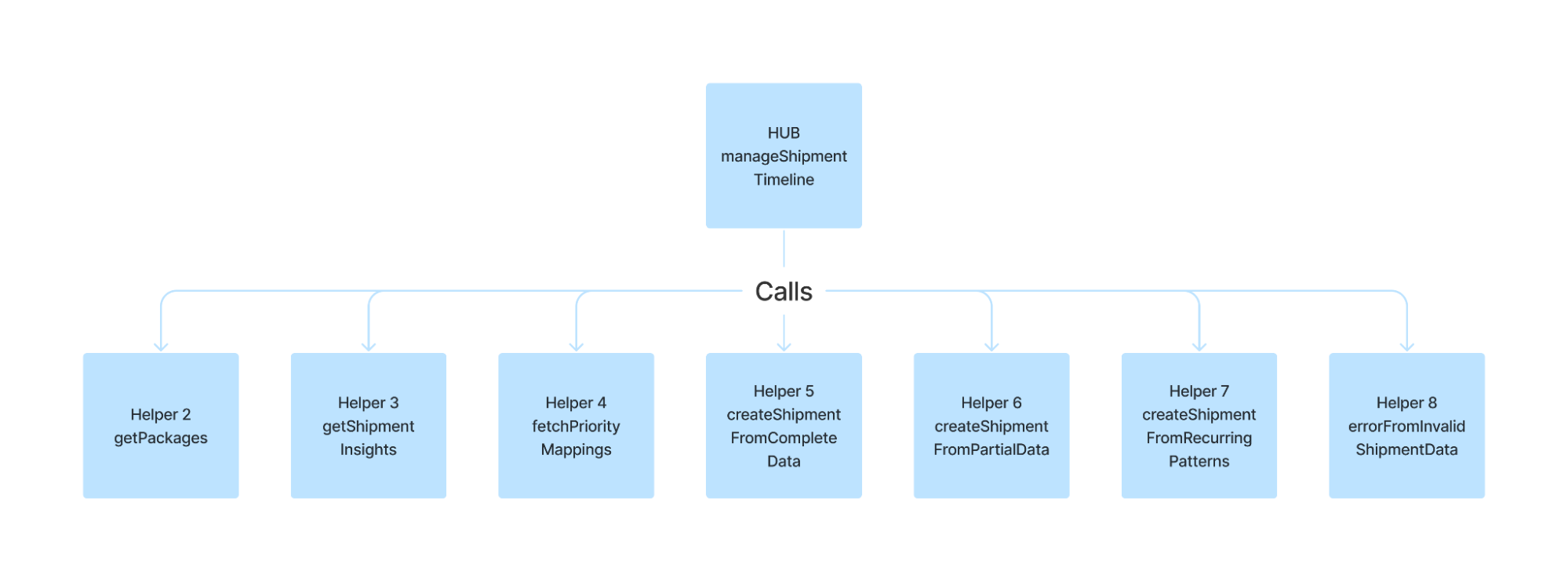
One-by-one, you move code blocks from some large function to individual helpers, until eventually, the original function does not contain any logic of its own; it consists entirely of calls to helpers. This function becomes a sort of “hub”, as the parent to many “worker” functions.
As you refactor, variables will be moved into helper functions, which can be a problem if they are needed elsewhere. There are two ways to account for this. The object-oriented approach is to convert function-scoped variables into class-scoped variables, which can then be assigned/updated/accessed across functions.
The declarative approach is to have your helper functions return data structures as necessary, containing all updated state information. If those values are needed elsewhere, they can be parameterized through a spec to other helpers. With that said, if you find yourself overly depending on these “transient” data stores, then you have probably misunderstood the coupling, or misformulated the abstraction.
Here is an example of a “hub”. We can easily imagine that this function would be ten times longer, if not for the diligent work of its helpers.
function manageShipmentTimeline(shipment) {
const packages = getPackages(shipment, details);
const shipmentInsights = getShipmentInsights(packages, details);
const priorityMappings = fetchPriorityMappings(packages, details);
const shipments = shipmentInsights.map((shipmentInsight) => {
const hasCompleteData = shipmentInsight.issueChecks.length
&& shipmentInsight.hasOverlappingItems.length
&& shipmentInsight.hasIssue.length;
const hasPartialData = shipmentInsight.verificationSteps.length
&& shipmentInsight.hasOverlappingItems.length
if (hasCompleteData) {
return createShipmentFromCompleteData(shipmentInsight, priorityMappings);
} else if (hasPartialData) {
return createShipmentFromPartialData(shipmentInsight, priorityMappings);
} else if (metadata.hasRecurringPatterns) {
return createShipmentFromRecurringPatterns(
shipmentInsight, priorityMappings);
} else {
throw errorFromInvalidShipmentData(shipmentInsight, priorityMappings);
}
});
return shipments;
}
As your hub function grows, you may be tempted to refactor it further by . But you probably shouldn’t. There is a readability benefit to having all of your worker function calls in one consolidated place. Someone can look at your hub and say, “ok, this portion of the program is doing these 10 things”, without having to chase down children of children of children. In a way, long functions are good.
DRY stands for “Don’t Repeat Yourself”. There are a few benefits of this philosophy:
Let me give a simple example to get us started. putDataToFiles has some repeated actions which are just starting to get too long.
function putDataToFiles(outDir, params) {
const avgDocLength = params.numTokens / params.docHashes.length;
if (fs.existsSync("/docIds.txt")) {
throw new Error(`File "/docIds.txt" already exists.`);
}
fs.writeFileSync("/docIds.txt", JSON.stringify(params.docHashes));
console.log(`Object successfully written to "/docIds.txt"`);
if (fs.existsSync("/tokenIds.txt")) {
throw new Error(`File "/tokenIds.txt" already exists.`);
}
fs.writeFileSync("/tokenIds.txt", JSON.stringify(params.tokensHash));
console.log(`Object successfully written to "/tokenIds.txt"`);
if (fs.existsSync("/docLengths.txt")) {
throw new Error(`File "/docLengths.txt" already exists.`);
}
fs.writeFileSync("/docLengths.txt", JSON.stringify(params.docLengthsMap));
console.log(`Object successfully written to "/docLengths.txt"`);
if (fs.existsSync("/aggInfo.txt")) {
throw new Error(`File "/aggInfo.txt" already exists.`);
}
fs.writeFileSync("/aggInfo.txt", JSON.stringify([
params.tokensHash.length,
params.documents.length,
params.numTokens,
avgDocLength
]));
console.log(`Object successfully written to"/aggInfo.txt"`);
}
By reducing repetition, we can also make the code more readable.
function putToFile(filename, object) {
if (fs.existsSync(filename)) {
throw new Error(`File "${filename}" already exists.`);
}
fs.writeFileSync(filename, JSON.stringify(object));
console.log(`Object successfully written to ${filename}`);
}
function putDataToFiles(outDir, params) {
const avgDocLength = params.numTokens / params.docHashes.length;
putToFile(outDir + "/docIds.txt", params.docHashes);
putToFile(outDir + "/tokenIds.txt", params.tokensHash);
putToFile(outDir + "/docLengths.txt", params.docLengthsMap);
putToFile(outDir + "/aggInfo.txt", [
params.tokensHash.length,
params.documents.length,
params.numTokens,
avgDocLength
]);
}
The boilerplate has been moved off to a helper function, putToFile. Now the main putDataToFiles function is kept to the distinguishing information. As you refactor, you should see your “primary” logic shrink.
For a slightly more intricate example of DRY, consider the following two very similar functions.
function processOrder(orderDetails) {
const { orderId, items, totalPrice } = orderDetails;
sendOrderConfirmationEmail(orderId);
processPayment(orderId, totalPrice);
updateInventory(items);
generateOrderSummary(orderId, items, totalPrice);
}
function processOrderExpress(orderDetails) {
const { orderId, items, totalPrice } = orderDetails;
sendOrderConfirmationEmail(orderId);
updateDeliveryStatusToExpress(orderId);
processPayment(orderId, totalPrice);
updateInventory(items);
generateOrderSummary(orderId, items, totalPrice);
}
The call to updateDeliveryStatus rudely interrupts our second function, making it a bit harder to refactor. My preferred solution is to use a flag (a boolean argument).
function processOrder(orderDetails, isExpressDelivery) {
const { orderId, items, totalPrice } = orderDetails;
sendOrderConfirmationEmail(orderId);
if (isExpressDelivery) {
updateDeliveryStatusToExpress(orderId);
}
processPayment(orderId, totalPrice);
updateInventory(items);
generateOrderSummary(orderId, items, totalPrice);
}
By making this change, we have reduced two functions to one function. We’ve reduced duplication, which is a win.
In this example, there is only one small difference between the functions, so it’s better to combine them. But as a word of warning, a function with too much conditional behavior becomes hard to read. To some extent, there’s a trade off between DRY and accounting for special cases. Sometimes it’s better to create two different utilities, rather than littering your code with if-statements.
We can make our solution more generic yet, with higher order functions (similar in most ways to dependency injection).
function processOrder(orderDetails, deliveryStatusUpdateFunc) {
const { orderId, items, totalPrice } = orderDetails;
sendOrderConfirmationEmail(orderId);
if (deliveryStatusUpdateFunc) {
deliveryStatusUpdateFunc(orderId);
}
processPayment(orderId, totalPrice);
updateInventory(items);
generateOrderSummary(orderId, items, totalPrice);
}
// lambda
const updateDeliveryStatusToExpress = function (orderId) {
// implement
}
processOrder(orderDetails, updateDeliveryStatusToExpress);
One of the best things about Javascript is that it has very convenient syntax for creating lambdas, sometimes called anonymous functions. In this example, processOrder takes `deliveryStatusUpdateFunc` as a parameter, making it more generic. A function that takes another function as input is called a “higher order function”. This gives whoever uses the function control over what happens when they call it.
As a closing point, I want to argue that what I’ve explored in this section actually understates the importance of DRY.
The practice of avoiding repetition essentially boils down to the principle of abstraction: the encapsulation of repeated requirements to apply over a range of situations. Abstraction is the fundamental basis of computer science. In fact, abstraction is largely what computer science is.
Computer science is to a large extent based in lambda calculus, which is based on function. Why are functions used in software development? If there were no need to avoid repetition, there would be no need for functions (except maybe for the aesthetic purpose of keeping code more organized). All of your code could go in one block. I.e., if this was a language that had it, all of your code would go in the main() function. Of course, that would be entirely unworkable. DRY is the principle which makes software development possible.
Of course, anything can be taken too far, becoming premature or forced. Lately, there has been somewhat of a backlash against DRY, a protest against “premature abstraction”. I share this understanding, to the extent that I am aware bad abstractions can be harmful, and we should take care that any abstractions are good abstractions. However, I maintain the belief that code duplication is a greater harm, and in fact accidental duplication is one of the worst forms of tech debt.
You don’t have to aim for maximum abstraction immediately. Start off just by implementing whatever you find easiest to implement. Then think critically about how your code can be refactored to reduce redundancy. A beautiful architecture is one where large new features require small code change.
Conventional wisdom is that a function should only do one thing, although the definition of “one thing” is highly subjective. If the name of your function has to contain the word “and”, then by definition it does more than one thing. I’m not going to say there’s a 100% chance it’s a bad function, but it’s definitely a code smell. Maybe there’s a 75% chance that it’s a bad function.
If your function is doing two things, then it should probably be refactored into
two functions, each of which to do one of the two things. If we need to do both things, then we can instead call
both of those functions in succession.
Here, the function readAndTruncateFile is doing two things: it’s reading the file, and it’s truncating the content.
// reads file and gets first 200 lines
const truncatedFileContent = readAndTruncateFile(fileName, {
head: 200
});
// search for lines with the substring "phone"
const searchResults = searchLines(truncatedFileContent, {
regex: "phone"
});
It’s better to separate the functions.
const fileContent = readFile(fileName);
const truncatedContent = truncateContent(fileContent, {
head: 200
});
const searchResults = searchLines(truncatedContent, {
regex: "phone"
})
Let’s suppose the requirements change, and you get the content some other way, other than from reading a file. In our old implementation, truncating the content was coupled to reading a file, so we would not be able to accomplish that with the functions we have. In our new implementation, we can easily swap functions in or out, depending on what operations we need.
This is a long-winded way of saying that readFile is interoperable with truncateContent. There are many forms of interoperability, but a main form: functions, programs, or APIs are interoperable if the output from one can be fed is the input to another. This can be accomplished largely via standardized/reused data types, as common argument types and return types.
if (pizzaStateStr === "orderPlaced") {
updatePizzasAsOrderPlaced(pizzas);
} else if (pizzaStateStr === "prep") {
updatePizzasAsPrep(pizzas);
} else if (pizzaStateStr === "baking") {
updatePizzasAsBaking(pizzas);
} else if (pizzaStateStr === "delivery") {
updatePizzasAsDelivery(pizzas);
} else if (pizzaStateStr === "delivered") {
updatePizzasAsDelivered(pizzas);
} else {
handleUndocumentedStateUpdate(pizzas);
}
Let's refactor this to use a switch statement instead.
switch (pizzaStateStr) {
case "orderPlaced":
updatePizzasAsOrderPlaced(pizzas);
break;
case "prep":
updatePizzasAsPrep(pizzas);
break;
case "baking":
updatePizzasAsBaking(pizzas);
break;
case "delivery":
updatePizzasAsDelivery(pizzas);
break;
case "delivered":
updatePizzasAsDelivered(pizzas);
break;
default:
handleUndocumentedStateUpdates(pizzas);
}
You may wonder why this is actually better. I can think of a couple reasons.
switch (pizzaStateStr) {
case "orderPlaced":
case "ordered":
updatePizzasAsOpenState(pizzas);
break;
case "prep":
case "prepared":
case "orderPrepared":
updatePizzasAsOrderPlacedState(pizzas);
// etc.
}
We do not have breaks between the strings that are synonyms, causing behavior to intentionally spill over.
let description;
switch(state) {
case "orderPlaced":
description = "A pizza has been ordered";
break;
case "prep":
description = "Preparing pizza";
break;
case "baking":
description = "Pizza is in oven";
break;
case "delivery":
description = "The pizza is being delivered to your location";
break;
case "delivered":
description = "The pizza has been delivered"
default:
description = "No state found"
}
We can improve the code above using a dictionary.
const stateDescriptionMapping = {
orderPlaced: "A pizza has been ordered",
prep: "Preparing pizza",
baking: "Pizza is in oven",
delivery: "The pizza is being delivered to your location",
delivered: "The pizza has been delivered",
};
const description = stateDescriptionMapping[state] || "No state found";
This is preferable, because as a rule, it’s good whenever you can move something from logic form (eg, a switch statement) to data form (eg, a JS object). The JS object can be pulled out into a JSON file. See the section on configs for more on that.
The use of Javascript dictionaries allows us to dynamically access given values, but what about dynamically calling functions? Well, we can do that too, using fancy Javascript syntax. Here is one of the switch statements from earlier, rewritten to call the functions dynamically using a dictionary.
const updateFunctionsMap = {
orderPlaced: "updatePizzasAsOrderPlaced",
prep: "updatePizzasAsPrep",
baking: "updatePizzasAsBaking",
delivery: "updatePizzasAsDelivery",
delivered: "updatePizzasAsDelivered",
};
const updateFunction = updateFunctionsMap[pizzaStateStr]
|| "updatePizzasAsDelivered";
PizzaUpdater[updateFunction](pizzas);
class PizzaUpdater {
updatePizzasAsOrderPlaced(pizzas) {
// implement
}
updatePizzasAsPrep(pizzas) {
// implement
}
updatePizzasAsBaking(pizzas) {
// implement
}
updatePizzasAsDelivery(pizzas) {
// implement
}
updatePizzasAsDelivered(pizzas) {
// implement
}
handleUndocumentedStateUpdate(pizzas) {
// implement
}
}
This tactic can be quite powerful. Here’s a sample of what dynamic function access can do.
function parseArraySequence(sequence, specs) {
const extractedValues = specs.map((valueSpec) => {
const { extractSpec, formatSpec } = { ...valueSpec };
const extractedValue = ValueExtractor[extractSpec.action](
sequence, extractSpec
);
const formattedValue = ValueFormatter[formatSpec.action](
extractedValue, formatSpec
);
return formattedValue;
});
return extractedValues;
}
// The logic modules. Functions not implemented; create whatever you need.
class ValueExtractor {
function1(sequence, spec) {
// implement
}
function2(sequence, spec) {
// implement
}
function3(sequence, spec) {
// implement
}
}
class ValueFormatter {
function1(value, spec) {
// implement
}
function2(value, spec) {
// implement
}
function3(value, spec) {
// implement
}
}
// example usage
const parseSpec = [
{
extractSpec: {
action: "readCsvLine",
index: 1
},
formatSpec: {
action: "getInteger",
decimalPlaces: 1
}
},
{
extractSpec: {
action: "readCsvLine",
index: 2
},
formatSpec: {
action: "getDate",
format: "mm/dd/yyyy"
}
}
];
const result = parseArraySequence(
"John Doe,10.00,03-29-99",
parseSpec
);
Of course, you are not obligated to take this exact approach. This is merely a presentation of what is possible. This design may be appropriate for a business context that requires that the operations of the code are highly customizable depending on the specific inputs and use case.
Notice in this example how much of the actual “work” is done by the parseSpec, defined only at the end. Most of the “code” of the program is contained within this object, even though it’s basically only JSON data. parseSpec is functioning like a config, so this is an example of what I (and some other people) call config-driven development.
In neuroscience, there is a rule, “neurons that fire together wire together”. In computer science, there ought to be a rule, “values that travel together are stored together”.
I find that almost all functions only need two arguments. The first argument should be the data being operated on, the second argument should be the spec, which indicates how it should be operated on.
This is one of the few topics with which I fully agree with Bob Martin: functions with more than 2 arguments is a code smell. Exceptions to this are rare. Maybe some helper functions are allowed 3 arguments.
Many people start function with “base cases”, which require if-statements for recursive solutions. But I recommend loop-iteration in favor of recursion, in which case, you sometimes don’t need the leading if-statement.
// BAD
function myFunc(myList) {
if (myList.length === 0) {
return [];
}
return myList.map((listItem) => {
listItem.someAction();
});
}
// BAD
function myFunc(myList) {
if (myList.length !== 0) {
return myList.map((listItem) => {
listItem.someAction();
});
}
return [];
}
// GOOD
function myFunc(myList) {
return myList.map((listItem) => {
listItem.someAction();
});
}
The last version is cleaner. Less gode is generally better than more code. The map function already accommodates the edge case of an empty list. I would even argue it’s not truly an edge case, zero is just a possible list size, which the loop handles perfectly fine, and need not be treated differently.
Here is a function that you might want to have more than 2 arguments.
function createEmployee(name, age, department, position, salary, startDate, isFullTime, benefits, supervisor) {
// Function logic to create an employee record
}
An employee has many properties, so we have to pass them all into the function, right?
Or maybe we can create an EmployeeFactory which has 9+ individualized setters dedicated to each of these values, so that the employee creation is spread across a large number of functions, thus reducing the load on the single createEmployee function? No, that’s not what I’m going to suggest.
In fact, this is the part where I have to rename the guide to “Pristine Typescript”, because the best solution to this is going to involve some sort of type system.
function createEmployee(employeeSpec: EmployeeSpec): Employee {
// Function logic to create an employee record
}
type EmployeeSpec = {
name: !string;
age: number;
department: Department;
position: !Position;
salary: !number;
startDate: DateTime;
isFullTime: !boolean;
benefits: Benefits;
supervisor: string;
}
There are numerous advantages to grouping arguments into specs, over leaving functions to have many arguments.
Without a spec, I see all of the arguments, but I don’t know what they’re for. This is a basic example, so I can easily guess that John Doe is the employee name, and that 25 is the age. But I can easily come across the number 84400, or the boolean “true”, and have no idea what they’re referring to. And in more complex examples, it’s even worse. These arguments have no labels! This is so bad that many IDEs have taken to adding text, not part of the code, which labels the arguments for you.
createEmployee("John Doe", 25, Department.Finance, Position.Accountant, 84400, DateTime.of("23/09/24"), true, Benefits.standard(), "Jane Jacobs");
The example using a spec is more readable by a mile. I don’t have to hunt down the function definition to figure out what everything is. All the labels are right there at call time.
createEmployee({
name: "John Doe",
age: 25,
department: Department.Finance,
position: Position.Accountant,
salary: 84400,
startDate: DateTime.of("23/09/24"),
isFullTime: true,
benefits: Benefits.standard(),
supervisor: "Jane Jacobs"
});
The way to get around this, in the first approach, is to use a long list of “undefinede”s.
createEmployee("John Doe", undefined, undefined, Position.Accountant, 84400.00, undefined, true, Benefits.standard(), undefined);
That’s really ugly. Most functions try to get around this by putting the most “required” parameters at the front, and the least “required” near the back. But what if you have several values that are all non-required; how are you going to guess which are the most likely to be populated when writing the function?
The spec approach fixes this. We can simply omit the fields that are not required. EmployeeSpec conveniently indicates which fields are required, and which are optional.
createEmployee({
name: "John Doe",
position: Position.Accountant,
salary: 84400,
isFullTime: true,
benefits: Benefits.standard(),
});
This item is sort of cheating, because it’s an advantage of type systems in general, and not specific to this case. But isn’t it nicer to have EmployeeSpec, which tells us the type information for each of the fields? This way, we know that “department” is an enum and not a string; we know that “salary” is a number and not some sort of Salary object. The spec type is telling the user what to pass into the function in clear and precise language.
Now that we have EmployeeSpec, we can use it in other places, like in the implementation of createEmployee.
Don’t think that this item is required to justify the creation of a spec type. Even if a spec type (such as EmployeeSpec) only exists for the benefit of a single function’s signature, it is still worth creating.
Consider the case where you want to call a helper function and pass in a few different values.
function createNewCard(cardModel, variableA, variableB, variableC, variableD) {
const score = getCardScore(cardModel, variableA, variableB, variableC, variableD);
const expiration = getCardExpiration(cardModel, variableA, variableB, variableC, variableD);
// more code
}
If this code was more complex, then the use to re-state all of the relevant variables is a hassle and makes it annoying to refactor. It’s much easier to group the variables together.
function createNewCard(cardModel, spec) {
const score = getCardScore(cardModel, spec);
const expiration = getCardExpiration(cardModel, spec);
// more code
}
If you have a type associated with `spec`, you can re-use that type too. Although that may technically be considered bad practice, because you're making your helper functions depend on a type which is not specific to them. However, one could argue that the convenience of this pattern trumps the shortcomings of less-specific (repurposed) types.
A magic number is any number in your business logic other than -1, 0, 1, and 2. You may think this is a joke, but that’s how I define it.
Don’t stop at magic numbers. There is also such a thing as magic strings. A magic string is, effectively, any string in your business logic other than empty-string. I do make exceptions for strings which are purely logic in nature (see below), but enums would be better.
function sendNotificationToCustomer(customerId) {
// This is an example of a hard-coded string (bad)
const notificationMessage = "Your order has been shipped!";
const customerEmail = getEmailAddress(customerId);
sendEmail(customerEmail, notificationMessage);
// This is an example of purely logical strings
// probably okay, but I would prefer we pass in enums instead
CustomerDispatchJob.refreshCalculatedHeaders([
"sendRequestStatus", "emailResponseLog"
]);
}
And lest we forget, there is such a thing as magic booleans! A magic boolean is, effectively, any boolean hard-coded in your business logic. With exceptions. In true business logic, you should virtually never see hard-coded booleans such as “true” or “false”.
To be clear, your code is going to operate on numbers, strings, and booleans. That’s what low-level code does. But those aren’t magic values because they live in variables. Primitive values only become a problem when they’re hard-coded.
Designs can vary so much that giving any prescriptions is risky. But in the effort to get across my conception of logic modules, I need to introduce a diagram.
The basic idea is that “pure” logic should be kept isolated from any actions which carry side effects, i.e., external API calls or DB requests. There are several advantages to “isolating” logic in this way, which will be discussed later. In a perfect world, you can move all of your business logic to logic modules, in which all of the functions are functional and pure.
In the case of code which must interact with some external system (what I call the “Request Controller”), there is some understanding that in certain circumstances, you will have to use hard-coded values, because to do otherwise would be more hassle than it’s worth, even contrary to what you’re trying to achieve.
However, in the case of “pure” business logic, there is no excuse not to offload all hard-coded values into configurations.
For this section’s example, I’ve created a function which has a log of hard-coded values.
function generateInvoice(invoiceSpec) {
const taxRate = 0.08;
let shippingCost = 0;
if (invoiceSpec.shippingMethod === "standard") {
shippingCost = 5.99;
} else if (invoiceSpec.shippingMethod === "express") {
shippingCost = 12.99;
} else if (invoiceSpec.shippingMethod === "overnight") {
shippingCost = 24.99;
}
const subtotal = invoiceSpec.quantity * invoiceSpec.pricePerItem;
const tax = subtotal * taxRate;
let total = subtotal + tax;
if (subtotal < 100) {
total += shippingCost;
}
if (invoiceSpec.shippingMethod === "express" && subtotal > 50) {
total -= 5;
}
if (invoiceSpec.dateCode === "SUMMER2024") {
total *= 0.9;
}
return {
subtotal: subtotal,
tax: tax,
total: total
};
}
I’m going to refactor this function twice. First with a basic swap-out of the hard-coded values, and then on a second pass, doing a larger refactor to make the function more generic. Here is my first refactor.
{
"shippingMethodStandard": 5.99,
"shippingMethodExpress": 12.99,
"shippingMethodOvernight": 24.99,
"salesDateCode": "SUMMER2024",
"salesDateAdjustment": 0.9,
"shippingCostThreshold": 100,
"specialDealAdjustment": 5,
"specialDealShippingMethod": "express",
"specialDealMinSubtotal": 50,
}
import config from './invoiceConfig.json'
function generateInvoice(invoiceSpec) {
const taxRate = config.taxRate;
let shippingCost = 0;
if (invoiceSpec.shippingMethod === "standard") {
shippingCost = config.shippingMethodStandard;
} else if (invoiceSpec.shippingMethod === "express") {
shippingCost = config.shippingMethodExpress;
} else if (invoiceSpec.shippingMethod === "overnight") {
shippingCost = config.shippingMethodOvernight;
}
const subtotal = invoiceSpec.quantity * invoiceSpec.pricePerItem;
const tax = subtotal * taxRate;
let total = subtotal + tax;
if (subtotal < config.shippingCostThreshold) {
total += shippingCost;
}
if (invoiceSpec.shippingMethod === config.specialDealShippingMethod && subtotal > config.specialDealMinSubtotal) {
total -= config.specialDealAdjustment;
}
if (invoiceSpec.dateCode === config.salesDateCode) {
total *= config.salesDateAdjustment;
}
return {
subtotal: subtotal,
tax: tax,
total: total
};
}
That’s all it takes to move magic numbers into a config.
My second refactor of the above code is a bit more involved, but for good reason: to make it more generic. Take at least some time to understand it.
I took a few additional steps: I made “salesDates” and “specialDeals” arrays, anticipating that there may be more in the future. I also added more structure to the config.
{
"taxRate": 0.08,
"shippingMethod": {
"standard": 5.99,
"express": 12.99,
"overnight": 24.99,
},
"salesDates": [
{
"dateCode": "SUMMER2024",
"adjustment": 0.9,
}
],
"shippingCostThreshold": 100,
"specialDeals": [
{
"adjustment": -5,
"shippingMethod": "express",
"minSubtotal": 50,
}
]
}
import config from './invoiceConfig.json'
// Take all the special adjustments to the total, and
// extract them into helper functions
function generateInvoice(invoiceSpec) {
const subtotal = invoiceSpec.quantity * invoiceSpec.pricePerItem;
const tax = subtotal * config.taxRate;
const rawTotal = subtotal + tax;
const totalWithShipipngCost = totalAdjustedForShippingCost(
rawTotal,
invoiceSpec
);
const totalWithSpecialDeals = totalAdjustedForSpecialDeals(
totalWithShipipngCost,
invoiceSpec
);
const totalWithSaleDates = totalAdjustedForSaleDates(
totalWithSpecialDeals,
invoiceSpec
);
return {
subtotal: subtotal,
tax: tax,
total: totalWithSaleDates
};
}
function totalAdjustedForShippingCost(total, invoiceSpec) {
const shippingCost = config.shippingCostMap[invoiceSpec.shippingMethod] || 0;
if (subtotal < config.shippingCostThreshold) {
return total + shippingCost;
}
return total
}
function totalAdjustedForSpecialDeals(total, invoiceSpec) {
const specialDeal = config.specialDeals.find((deal) => {
const { shippingMethod, minSubtotal } = { ...deal };
if (shippingMethod && shippingMethod !== invoiceSpec.shippingMethod) {
return false;
}
if (minSubtotal != undefined && minSubtotal <= invoiceSpec.subtotal) {
return false;
}
return true;
});
if (specialDeal) {
return total + specialDeal.adjustment;
}
return total;
}
function totalAdjustedForSaleDates(total, invoiceSpec) {
const saleDate = config.saleDates.find((salesDate) => {
salesDate.dateCode === invoiceSpec.dateCode
});
if (saleDate) {
return total * saleDate.adjustment;
}
return total;
}
Since the logic relies heavily on the config, This design pattern can be called “Config-Driven development”. But in truth, the direction of causality goes other way than the name implies. The business requirements inform the business logic, and then the business logic informs the design of the config. The basic sequence of events are as follows.
The original generateInvoice function completes step 2. The first refactored version completes step 4. The final refactor completes step 5.
So far we’ve seen config data fill in the details in code, but what about the opposite - code filling in the details of a config?
In this example, we have the JSON config for messages already.
{
"messageTemplates": {
0: {
"subject": "Your Order Confirmation for Order #{{orderId}}",
"body": "Dear {{firstName}},\n\nThank you for your order. Your order #{{orderId}} has been confirmed. It will be delivered to you by {{deliveryDate}}. If you have any questions or concerns, feel free to contact us.\n\nBest regards,\nThe XYZ Team"
},
1: {
"subject": "Payment Confirmation for Order #{{orderId}}",
"body": "Dear {{firstName}},\n\nWe have received your payment for order #{{orderId}}. The total amount of ${{totalAmount}} has been successfully processed. Your order is now being prepared for shipment.\n\nThank you for shopping with us.\n\nSincerely,\nThe XYZ Team"
},
2: {
"subject": "Shipping Update for Order #{{orderId}}",
"body": "Dear {{firstName}},\n\nWe are pleased to inform you that your order #{{orderId}} has been shipped. You can expect it to arrive by {{deliveryDate}}. Here is the tracking information: {{trackingNumber}}.\n\nIf you have any questions or need further assistance, please let us know.\n\nBest regards,\nThe XYZ Team"
}
}
}
The business hands us these templates. They just want us to populate the dynamic values (names, dates, etc.). Let’s say we already have the data:
[
{
"templateId": 0,
"orderId": 120043,
"firstName": "Michael",
"deliveryDate": "12/02/2024"
},
{
"templateId": 1,
"orderId": 120054,
"firstName": "Michael",
"totalAmount": 105.99
},
{
"templateId": 1,
"orderId": 120053,
"firstName": "Jacob",
"totalAmount": 200
},
{
"templateId": 2,
"orderId": 120059,
"firstName": "Benjamin",
"deliveryDate": "12/04/2024",
"trackingNumber": 3000022
}
]
Being given the config and the data, the actual implementation of the logic simply falls out of the requirements.
import messageConfig from './messageConfig.json'
function formatMessages(messageDataArray) {
const messageTemplates = messageConfig.messageTemplates;
return messageDataArray.map((messageData) => {
const template = messageTemplates[messageData.templateId];
return Object.keys(messageData).reduce((result, keyword) => {
// the corresponding value from the current record
const value = messageData[keyword];
// use regex to replace all instances of {{keyword}} in the template
const regex = new RegExp("{{" + keyword + "}}", "g");
const subject = result.subject.replace(regex, value);
const body = result.body.replace(regex, value);
return { subject: subject, body: body };
}, template)
});
}
When you notice that some set of variables frequently show up adjacent to each other, then that’s a cue that perhaps they should be grouped in the same data structure.
For the next example, let’s take a brief detour into the world of object-oriented programming.
For some college class, I wrote the following horrible, very bad code.
function evaluateShort(files, state) {
readFromFiles(files);
let aggScore1 = state.aggregateTrueRelevant.score1;
let aggScore2 = state.aggregateTrueRelevant.score2;
let aggScore3 = state.aggregateTrueRelevant.score3;
let aggScore4 = state.aggregateTrueRelevant.score4;
let aggScore5 = state.aggregateTrueRelevant.score5;
let aggScore6 = state.aggregateTrueRelevant.score6;
for (queryId of state.results.keys()) {
let score1 = state.trueRelevance[queryId].score1;
let score2 = state.trueRelevance[queryId].score2;
let score3 = state.trueRelevance[queryId].score3;
let score4 = state.trueRelevance[queryId].score4;
let score5 = state.trueRelevance[queryId].score5;
let score6 = state.trueRelevance[queryId].score6;
for (let document of state.results[queryId]) {
// I’ve simplified the code somewhat for the purpose of the example
// so pretend that the += operations are some more complicated
// mix of operations.
score1 += document.score1;
score2 += document.score2;
score3 += document.score3;
score4 += document.score4;
score5 += document.score5;
score6 += document.score6;
}
console.log("score 1: " + state.score1
+ "score 2: " + state.score2
+ "score 3: " + state.score3
+ "score 4: " + state.score4
+ "score 5: " + state.score5
+ "score 6: " + state.score6);
// I’ve simplified the code somewhat for the purpose of the example
// so pretend that the += operations are some more complicated
// mix of operations.
aggScore1 += score1;
aggScore2 += score2;
aggScore3 += score3;
aggScore4 += score4;
aggScore5 += score5;
aggScore6 += score6;
}
aggScore1 /= state.results.size();
aggScore2 /= state.results.size();
aggScore3 /= state.results.size();
aggScore4 /= state.results.size();
aggScore5 /= state.results.size();
aggScore6 /= state.results.size();
console.log(aggregateOfQueries.stringifyResult(
"aggregate score 1: " + aggScore1
+ "aggregate score 2: " + aggScore2
+ "aggregate score 3: " + aggScore3
+ "aggregate score 4: " + aggScore4
+ "aggregate score 5: " + aggScore5
+ "aggregate score 6: " + aggScore6))
}
After reading some material about how to write better code, I refactored it as follows.
function evaluateShort(files, state) {
readFromFiles(files);
const aggregateOfQueries = new DocumentScores(state.aggregateTrueRelevant);
for (let queryId of state.results.keys()) {
const evaluatedQuery = new DocumentScores(state.trueRelevance[queryId]);
for (document of state.results[queryId]) {
evaluatedQuery.evaluateDocument(document);
}
console.log(evaluatedQuery.stringifyResult(queryId));
aggregateOfQueries.sumWithOtherDocument(evaluatedQuery);
}
aggregateOfQueries.averageByDividingBySize(state.results.size());
console.log(aggregateOfQueries.stringifyResult(state.results.size()))
}
class DocumentScores {
constructor({ score1, score2, score3, score4, score5, score6 }) {
this.score1 = score1;
this.score2 = score2;
this.score3 = score3;
this.score4 = score4;
this.score5 = score5;
this.score6 = score6;
}
evaluateDocument(document) {
this.score1 += document.score1;
this.score2 += document.score2;
this.score3 += document.score3;
this.score4 += document.score4;
this.score5 += document.score5;
this.score6 += document.score6;
}
sumWithOtherDocument(otherDocumentScores) {
this.score1 += otherDocumentScores.score1;
this.score2 += otherDocumentScores.score2;
this.score3 += otherDocumentScores.score3;
this.score4 += otherDocumentScores.score4;
this.score5 += otherDocumentScores.score5;
this.score6 += otherDocumentScores.score6;
}
averageByDividingBySize(numDocuments) {
// this function can be simplified further using a loop
this.score1 /= numDocuments;
this.score2 /= numDocuments
this.score3 /= numDocuments
this.score4 /= numDocuments
this.score5 /= numDocuments
this.score6 /= numDocuments
}
stringifyResult(qNum) {
return "score 1: " + this.score1
+ "score 2: " + this.score2
+ "score 3: " + this.score3
+ "score 4: " + this.score4
+ "score 5: " + this.score5
+ "score 6: " + this.score5
}
}
Notice how the sumWithOtherDocument function only takes in a single argument, another instance of DocumentScores. This is reminiscent of earlier advice: “values that travel together are stored together.” All of the values in that instance are “traveling” together.
The only function which takes in more than 1 argument is the constructor. (This approach uses a constructor because it’s object-oriented, but we could easily refactor this to be functional).
My initial impetus for refactoring this was the observation that a few variables: score1, score2, score3, etc., were all appearing together. I grouped these scores using a data structure, DocumentScores. Once that was done, I noticed another use for the data structure. There was an additional set of variables exhibiting the same structure: aggScore1, aggScore2, aggScore3; these variables were always found together, and they too could be grouped using DocumentScores.
Inheritance is one of those things that you’re taught about in school, only to later learn that it’s a bad practice. Inheritance is based on the premise that your data model can be represented as a neat tree. Toy examples are constructed to demonstrate this assertion.
But in reality, your data model often ends up looking something more like this.
Javascript doesn’t support multiple inheritance. Some languages do, but either way, this is getting a little messy. Inheritance is fine when the relationships are very simple, but not more complex data models.
Another problem of inheritance is that it tightly couples subclasses to superclasses. By inheriting so much behavior, subclasses have less control over the functionality of their objects. As a result, changes to super classes can inadvertently break subclasses.
So what do we use instead? We use composition! As a quick refresher on the difference, suppose you have the superclass Animal
class Animal {
constructor(name) {
this.name = name;
}
makeSound() {
console.log(`${this.name} makes a sound.`);
}
}
You can extend using inheritance.
class Dog extends Animal {
constructor(name) {
super(name);
}
wagTail() {
console.log(`${this.name} wags its tail.`);
}
}
Or utilize composition.
class Dog {
constructor(name) {
this.animal = new Animal(name);
}
wagTail() {
console.log(`${this.animal.name} wags its tail.`);
}
makeSound() {
this.animal.makeSound();
}
}
Also, if Animal was passed in as an argument through to the constructure, rather than initialized in the Dog class, then this would be an example of the dependency injection pattern.
I’ve only scratched the surface of the difference between composition and inheritance, so I encourage you to research in more detail. I’m partial to the Entity Component System (ECS), most often found in video games.
There are types, and there are classes. Types should not behave as classes, and vice versa.
Other authors refer to types as “Data Structures”, and classes as “Objects”, but it’s the same general idea. Other authors use other terminology. You might prefer other terminology more, but I don’t really care what you call it. The big idea is that there are structures like these:
// Type
type TreeNode = {
left: TreeNode | TreeLeaf;
right: TreeNode | TreeLeaf;
}
type TreeLeaf = {
content: string
}
And there are structures like these:
// Class
class TreeParser {
traversalStrategy: TreeTraveralStategy;
constructor(traversalStrategy: TreeTraveralStategy) {
this.traversalStrategy = traversalStrategy;
}
findToken(token: string) {
// implement
}
}
The difference is:
A structure should not try to be both. This means that public variables in classes are bad.
“But if all class variables need to be made public, then we’re just going to make gettters and setters for all of them.” I hate to break it to you, but getters and setters are bad too. When you’re talking about supporting getters and setters, something has already gone deeply wrong.
Getters and setters are coping mechanisms to try to deny the fact that, sometimes, you just need some fields to be exposed. Getters and setters expose variables, so what’s the point in making them private?
Note: by “getters and setters”, I’m not talking about functions which do some complex state-checking, which calculate whether everything is compatible. I’m talking about trivial functions, like this:
class ClassA<T> {
private variableA: T;
private variableB: T;
private variableC: T;
private variableD: T;
private variableE: T;
private variableF: T;
constructor(variableA: T, variableB: T, variableC: T, variableD: T, variableE: T, variableF: T) {
this.variableA = variableA;
this.variableB = variableB;
this.variableC = variableC;
this.variableD = variableD;
this.variableE = variableE;
this.variableF = variableF;
}
miscellaneousFunction() {
// implementation
}
// getters and setters
getVariableD(): T {
return this.variableA;
}
setVariableD(variableD: T) {
this.variableD = variableD;
}
getVariableE(): T {
return this.variableA;
}
setVariableE(variableD: T) {
this.variableD = variableD;
}
getVariableF(): T {
return this.variableA;
}
setVariableF(variableD: T) {
this.variableD = variableD;
}
}
What a total failure that has allowed this to happen.
If you need some fields to be exposed, that’s fine! But those fields should live in a type structure, not in a class.
class ClassA<T> {
public variableA: T;
public variableB: T;
public variableC: T;
constructor(variableA: T, variableB: T, variableC: T) {
this.variableA = variableA;
this.variableB = variableB;
this.variableC = variableC;
}
miscellaneousFunction(structure: TypeA<T>) {
// implementation
}
}
type TypeA<T> = {
variableD: T;
variableE: T;
variableF: T;
}
So, so much better.
Instanceof is a keyword which allows you to check the class of an instance (among other things). Here’s an example of how you might use it.
class CsvFile {
// some fields
}
class CsvFile {
// some fields
}
class JsonFile {
// some fields
}
class RawTextFile {
// some fields
}
function processFile(file) {
if (file instanceof CsvFile) {
// note: if this is javascript, you may also have to do type assertion as well,
// or class casting in other typed languages
// eg: ` processCsvFile(file as CsvFile); `
processCsvFile(file);
} else if (file instanceof ExcelFile) {
processExcelFile(file);
} else if (file instanceof JsonFile) {
processJsonFile(file);
} else if (file instanceof RawTextFile) {
processRawTextFile(file);
}
}
The else-if changing is a code smell. The problem with this function is its failure to utilize a feature of object-oriented programming: dynamic dispatch. Here is the refactor.
// we don't even need this function any more!
function processFile(file) {
file.processFile()
}
class CsvFile {
// some fields
processFile() {
// implement
}
}
class CsvFile {
// some fields
processFile() {
// implement
}
}
class JsonFile {
// some fields
processFile() {
// implement
}
}
class RawTextFile {
// some fields
processFile() {
// implement
}
}
function processFile() {
// the dynamic dispatch happens here
file.processFile();
}
We have replaced the long chain of else-ifs with a single call, and built a more robust solution by integrating with the data structures that we have. I would go so far as to say that you should never use instanceof or typeof keywords, with the possible exception of implementations of deep equality checks.
If you were paying close attention, you may have found this section reminiscent of the section on conditionals. The reason for that is that this is just the same advice, but applied to the object-oriented space, rather than the functional space. It’s worth knowing good practices in both domains.
This section would not be legitimate without the famous saying, started by Phil Karlton, and updated by Leon Bambrick:
“There are 2 hard problems in computer science: cache invalidation, naming things, and off-by-1 errors.”
This saying is wrong on all counts, because these are solved problems in computer science. In particular, naming things is just a question of following certain guidelines.
Can you spot the bug in this code?
if (this.flights.includes(this.matchingFlight)) {
this.flights.push(this.matchingFlight);
}
It’s a trick, there are actually two bugs! The variable `this.flights` is a number representing a number of flights, and therefore does not support the `includes` function. Additionally, `this.matchingFlight` is a boolean representing whether there are matching flights, and we don’t want to add a boolean to any list.
class FlightTracker {
// the number of flights
flights: number;
// whether or not there is a matching flight
matchingFlight: boolean
// functions
}
What, you didn’t know that information? Well, we should have chosen variable names that better indicated their types. Here is what they should have done instead.
class FlightTracker {
// these names make it harder to misuse the variables
numFlights: number;
isMatchingFlight: boolean
// functions
}
There is a lesson from this example: names should imply type. Emphasis on the word “imply”; we aren't going for Hungarian notation here. But the reader should be able to accurately guess the type by looking at the name. Let’s go over a few rules.
Booleans should be prefixed with a simple preposition, such as: “is”, “can”, “has”, and “are”. For example, “isDuplicate”, “hasMatchingFlight”, “canBeUpdated”, and “areScreened”. In practice, “is” is by far the most common prefix.
Arrays should always have a plural name, which in English means putting an “s” at the end. For example, a list of asset files would be named “dataFiles”, not something like “dataFile”. This convention works well for short names.
“Array” also makes sense as a suffix; some even prefer the “arr”. (I don’t recommend the “arry” suffix, because at that point you might as well just write out “array”).
Numbers can be prefixed with “num”. For example, “numFlights” and “numInmatesChecked”. If the variables were just “flights” or “inmatesChecked”, then that would overlap with the naming convention for arrays, confusing the reader. This way usually works the best for variables of a wider scope, where the user doesn’t care about how the number was derived.
A second option for numbers is to use some number-y suffix. Keep it simple. If the number is formed by incrementing, suffix with “count”, as in “flightsCount”. If the number is formed by addition, suffix with “sum”, as in “sortiesSum”, or prefix with “total” as in “totalPrice”. If the number is formed by multiplication, prefix with “product” (although that one is less common), and so on. This way usually works the best for variables which have a small scope, like if they’re isolated to a single function.
A third option is for quantities with specific units. For these, the name should always contain the unit in question. Prefer “weightInKilos” to “weight”, prefer “timeInMillis” to “time”, prefer “ageInYears” to “age”, prefer `distanceInMiles` to `distance`, etc. WIth that said, if you find yourself using a specific unit several times, consider creating a formal type which wraps that unit.
Strings can usually get away with being a little less strict. The words “word”, “name”, and “id” almost always indicate the value is a string. For example, “codeWord”, “bookName”, or “documentId”. I only suffix with “string” in the rare case that I truly can’t think of a better alternative.
Objects should share the vocabulary from the name of whatever type they are. Instances of classes should do the same for the names of the class they instantiate.
You might say, “I don’t need to include type information in the name, because I’m using a typed language, so I can just look at the type.” But it’s not only about documentation, it’s also about being accurate.
“matchingElement” is a bad name for a boolean, because it implies that it holds an element, which is false. “dataFile” is a bad name for an array, because it implies that it holds a single file, which is false. “flights” is a bad name for the number of flights, because it indicates that the value is an array of flights, which is false. Almost all English words, real or fake, imply some type information, so you should make sure that type information is correct.
All of the rules for variable naming above also apply to function naming. The name of a function should indicate the type of its return value.
function countInStockProducts(products) {
return products.reduce((count, product) => {
return product.inStock ? count + 1 : count;
}, 0);
}
In this case, the function returns an integer representing the number of products in stock. Therefore, the prefix is “count”, indicating the return type.
But what about functions which do not have a return value? What about functions like this next one? The key is in the first word of the function name. In the last function, the first word was “count”. For the next function, the next word is “update”.
function updateInventoryQuantity(itemId, newQuantity) {
const item = findItemById(itemId);
if (item) {
item.quantity = newQuantity;
saveItemToDatabase(item);
}
}
The following convention will serve you well.
Obeying these guidelines, the names of functions indicate to the user whether or not they can expect a return value.
This piece of advice is controversial. Most people will tell you to give all of your functions verb phrases. It might feel weird to name a function “parsedDataset”, or even just “dataset”, if the dataset has not been parsed before the function call. It will feel more natural if your whole codebase is like that. But your codebase uses a different convention, then follow that. Regardless, function names should clearly indicate whether something is returned.
Do you notice anything wrong with the following function definition?
function updatePizzaToNewState(pizzas) {
// implementation
}
The problem is that it starts with “updatePizza”, when clearly the argument is “pizzas”. The function takes in an array, but the name of the function incorrectly implies that the argument should be a single pizza.
We simply need to change “Pizza” to “Pizzas”.
function updatePizzasAsNewState(pizzas) {
// implementation
}
When a function operates on some primary argument, then it’s common to put the name of that argument in the name of the function. This is good practice. But remember that when you do this, you represent the type of the object accurately.
Under no circumstances should the word "not'' find its way into the name of your boolean. Virtually every programming language already has a built-in symbol that means "not" in boolean speak: the exclamation point. Why spell out the word "not" when you can just use "!"? Simply replace the former with the latter.
const doesNotContainDuplicates = doesNotContainDuplicates(myArray)
if (!doesNotContainDuplicates) {
return;
}
This code is confusing to the reader because it contains a double-negative. "not does not contain duplicates"? The brain has to do some math to figure out this actually means “does contain duplicates”. Programmers are usually smart people, so they can figure it out if they are paying attention, but why are you forcing them to pay attention? Make it easier on your reader.
const containsDuplicates = containsDuplicates(myArray)
if (containsDuplicates) {
return;
}
If you need to negate the condition, it is still relatively readable
// this is still better than "if (doesNotContainDuplicates)"
if (!containsDuplicates) {
return;
}
The same logic would apply to a variable called `isInvalid`. Even if the primary thing you want to check for is invalidity, it’s better to call the variable `isValid`, for two reasons.
Of the four functions below,
function_1(book) {
return book && book.author && book.title && book.releaseDate;
}
function_2(book) {
if (book && book.author && book.title && book.releaseDate) {
this.logBookIssue(book);
throw new Error("Book Not Valid");
}
}
function_3(book) {
return {
author: book.author || "Anonymous",
title: book.title || "Untitled",
releaseDate: book.releaseDate || "Undated",
};
}
function_3() {
return this.bookArray.find((book) => {
return book && book.author && book.title && book.releaseDate;
});
}
Answers:
We can quibble about some of these, but a common mistake is to call function_1 anything “validateBook” rather than “isValidBook”. Remember: nouns vs verbs. function_1 isn’t performing some side effect, it’s returning a boolean.
These functions are very similar.
function publishTransformedTransaction(transaction) {
// implementation
}
function publishTransformedTransactions(transactions) {
// implementation
}
This can lead to bugs when the user accidentally calls the wrong one. I’ve run into situations where I couldn’t figure out why my automated test was failing, but then I realized I forgot the “s” at the end.
We can make these functions more distinct.
function publishSingleTransformedTransaction(transaction) {
// implementation
}
function publishTransformedTransactionsBatch(transactions) {
// implementation
}
Also remember that, when people are reading or refactoring your code, they will frequently search using “command-F”. Although most IDEs offer more advanced functionality, reducing the number of variable/function names which are substrings of other variable/function names is a generally polite and welcome practice.
How long should a variable be? The best rule I’ve found is from the Go language style, although I don’t know where the rule originates from:
The general rule of thumb is that the length of a name should be proportional to the size of its scope and inversely proportional to the number of times that it is used within that scope.
This means that if a variable is used more often, then for convenience we make it shorter. But the more interesting rule to me is about the scope.
If a variable has a very small scope, then it can be a single character, such as “i”.
const filteredItems = items.filter((i) => i.active);
If a variable has a scope of a few lines, then it can be a single word, such as “item”.
const activeOddItemCaches = itmes.map((item) => {
if (item.number % 2 == 0) {
return item.cache;
} else {
return item.previousCache;
}
});
If a variable has the scope of a mid-sized function, then it can be 1-2 words in length, such as “itemArray”.
function processItems(itemArray) {
const total = itemArray.reduce((total, item) => {
return total + item.price;
}, 0);
const averagePrice = total / itemArray.length;
return averagePrice;
}
And continued:
With all of that said, don’t make variables long just for the sake of it. Variables should only be as long as necessary to expressively communicate that the variable is for.
If a variable has a more limited scope, then the variable name doesn’t have to do as much heavy-lifting. If the variable crosses a large scope, then we cannot rely on context to infer what the variable is for, so the variable really has to have a descriptive name.
The rule for functions is the opposite of variables:
For functions, the length of a name should be inversely proportional to the size of its scope.
What this means, in practice, is that the length of functions increases as you move “down” the call stack.
// function name is 16 characters long
function mergedThreadData(thread, stateInfo) {
const threadRecords = [];
threadRecords.push(...getThreadAssignedTags(thread, stateInfo));
threadRecords.push(...getThreadEngagements(thread, stateInfo));
threadRecords.push(...getThreadTriggers(thread, stateInfo));
return threadRecords;
}
// function name is 21 characters long
function getThreadAssignedTags(thread, stateInfo) {
const tagAssignments = stateInfo.assignedTags.filter((tag) => {
tag.threadId === thread.threadId;
});
return tagAssignments.mape((tag) => {
if (isTrending(tag)) {
return formattedTrendingAssignedTag(tag, stateInfo);
} else {
return formattedNonTrendingAssignedTag(tag, stateInfo)
}
})
}
// function name is 29 characters long
function formattedNonTrendingAssignedTag(tag, stateInfo) {
// implement this this
}
Naturally, functions nearer to the bottom are more specialized, and the descriptiveness of their names reflects that by becoming more specific.
Names of key objects should be descriptive enough that if someone does a command-F over your a 1 million-line codebase, they only find references to the variable in question, because nothing else is called that.
Names should be descriptive. Suppose you see components called SystemCaseHelper and DataUserFactory. Ask yourself, what do these do? They help the cases of the system? They use data in a factory-like way? That doesn’t tell us anything. These are empty, vacuous names.
If there is a word in a name which doesn’t communicate anything, or only exists to make the component sound more “official”, delete that word.
Now suppose you see components called AnnuityTransactionHeader and LsatScoreConverter. It’s much easier to guess what these do.
More examples below.
|
Title |
Names |
Notes |
|
Names I don’t like |
data, case, system, builder, creator, factory, object, user, helper, machine, process |
When I see a name with these words in it, 50% of the time, it’s a bad name. |
|
Names I’m ambivalent towards |
template, transformer, reader, writer, supervisor, observer, bundle |
When I see a name with these words in it, 20% of the time, it’s a bad name. |
|
Names I like |
score, header, record, translator, extractor, formatter, transaction, migrator
domain-specific names, industry-specific names |
When I see a name with these things in it, 10% of the time, it’s a bad name. |
Exercises for the reader:
It’s great to use domain-specific and industry-specific names. But you need your team to agree on what to use.
Be lazy. Steal your variable names from those in other functions. Don’t use function-specific lingo unless there’s a compelling reason to do so.
// function with parameter named applePie
function funcX(applePie) {}
// calling the function, passing in an argument, which is a variable
// also called applePie
funcX(applePie);
A unit test is a test of a small piece of code (i.e., a unit of code). In practice, most unit tests call single functions, and check the result.
And I want to tell you that you shouldn’t write unit tests for functions with side-effects. This means:
I’m not saying to not write functions for these. But what functions you do write will not be unit tests. They’ll be integration tests.
Here’s my rationale. Insofar as the high-level functions are composed of self-contained, testable units, then they should be refactored to not depend on external services, such as databases and APIs. Insofar as your functions are inherently tied to external services, then integration tests are more appropriate than unit tests.
If you end up trying to write unit tests for these functions, then you will find that making the tests run will require you to set up an extensive system of mocks. Your tests become as much mocks as they are tests, with your expects essentially just verifying that you set up the mocks correctly.
I think this is bad, which leads me to my next topic.
The realization that mocks are bad is hard-won. For those unfamiliar with what mocks are, here is a brief example.
class MathExample {
add(a, b) {
return a + b;
}
calculateSumAndDouble(x, y) {
const sum = add(x, y);
return sum * 2;
}
}
describe("calculateSumAndDouble():", () => {
it("should double the sum of two numbers", () => {
const addMock = jest.spyOn(MathExample, "add").mockReturnValue(7);;
const result = calculateSumAndDouble(3, 4);
// Ensure that add function was called with correct arguments
expect(addMock).toHaveBeenCalledWith(3, 4);
// Ensure that the result is correct
expect(result).toBe(14);
// Restore the original add function
addMock.mockRestore();
});
});
The “calculateSumAndDouble” function is the function we are trying to test. So we call it, get the result, and check that it’s 14.
However, the “calculateSumAndDouble” function also calls the “add” function. By calling calculateSumAndDouble, the coverage accidentally “spills over” to add. We (supposedly) want to make sure that our test is isolated to the logic implemented in calculateSumAndDouble.
Therefore, we create a spy, named “addSpy” on the add function. When the add function gets called, the control flow will not go to the function implementation. Instead, the code will defer to the hard-coded mock return value, in this case 7. That is what `add` will return.
At some places, it is considered good practice to mock every function that isn’t the one you are specifically testing, as much as needed to prevent any test from “spilling over” into secondary functions. Some teams even consider it good practice to mock private functions. (Spoiler: I disagree with all of this).
Now that I’ve explained what mocks are, I’m going to explain why you should avoid them as much as possible.
When a test executes some action, the purpose of the test should be to assert that your codebase carries out the action fully and correctly. If the test coverage “spills over” to helper functions, or even different units, then that is appropriate, because that reflects what the action is doing. As one could say, that is a feature, not a bug. Mocks short-cut this by artificially suppressing and replacing some part of your codebase. In so doing, they compromise the reason the test is supposed to exist.
After enough mocks, your asserts become redundant. All that they are doing is confirming that your mocks return what the tests themselves made the mocks return. It turns into a big test-contained loop, consisting of testing for its own sake, not to actually reveal anything about the code base.
One of the most valuable aspects of tests is the fact that they serve examples of the behavior of code. If I want to know how a specific function works, I can head over to the tests, grab an illustrative example, run it, and easily intuit what the function is for. But in order for functions to serve as informative examples, they need to correctly model the function behavior that the end user would expect in a realistic example. Mocks disrupt this by imposing artificial behavior that is not actually what you would get.
Tests should not expose implementation details. Another way of putting this is that function implementation details should not “leak” into the tests, except indirectly insofar as they affect end behavior.
Fail to do this, and down the road, you will come to grief. Suppose you want to refactor a group of functions to be more performant and well-organized. If you built the architecture of your code into the mocks, you cannot do this. If a function calls a different helper than it did in the past, your mock will no longer work. Your tests have become too tightly coupled to a specific implementation. Which is ironic and sad, because the whole point of tests is that they accurately check for regressions (that they work!) in the case that the implementation changes.
I’ll explain the difference between the two schools of testing, in table format.
|
Testing type |
White-box testing |
Black-box testing |
|
Visibility |
Person writing the tests will base their testing on reading the software implementation. |
Person writing the tests will base their testing on reading the software documentation. |
|
Confirmation Type |
Verification: we check that the code can perform its actions without producing unexpected errors. |
Validation: we check that the software behavior matches the documentation, and matches the expectations of end users. |
|
Coverage |
Person writing the tests will ensure high coverage by manually checking lines of code against tests they are writing. |
Person writing the tests will check all functionality of the software. If they test all functionality, this should result in full test coverage, because all code should affect the functionality. If there is code that has no effect, it should not be there. |
|
Test Content |
We write elements into the tests which are specific to implementation details of the code (eg: spies, mocks, testing of private functions). |
We are “blind” to the specific implementation of what we are testing. |
To cut to the chase, white-box testing is bad. Although we will need to borrow from white-box testing in some ways, your goal should be to always move in the direction of black-box testing.
Although Javascript is a superficially simple language, it has a few “gotchas” which can be confusing to some people, for example those from a Java background.
This is the part of the guide where I wade into matters specific to Javascript syntax, so if you’re just looking for general programming advice, you’re free to skip it.
I’ve put together some functions which, although not necessarily great functions, do exemplify common JS syntax patterns.
function getRandomGadgetWidgetAndGizmo(assortedMap) {
const { gadgets, widgets, gizmos } = { ...assortedMap };
const getRandom = (arr) => arr[Math.floor(Math.random() * knickKnacks.length)];
const randomGadget = getRandom(gadgets);
const randomWidget = getRandom(widgets);
const randomGizmo = getRandom(gizmos);
return {
randomGadget: randomGadget,
randomWidget: randomWidget,
randomGizmo: randomGizmo,
};
}
function exciseLogEntries(logEntries, suffixes) {
const LOG_EXCISISION_STRING = process.argv[1];
const LOG_REPLACEMENT_SUBSTRING = process.argv[2];
Object.keys(logEntries).forEach((key) => {
if (logEntry === LOG_EXCISISION_STRING) {
delete logEntries[key];
}
if (LOG_REPLACEMENT_SUBSTRING.includes(logEntry)) {
const suffix = suffixes[logEntry.slice(0, 3)];
logEntries[`${key}_${suffix}`] = logEntries[key];
delete logEntries[key];
}
});
}
function createLogMessage(message, maxMessageLength, metadata = {}) {
if (!message) {
const logMessage = 'Message is required';
// temporary warning for debugging purposes; should delete
console.warn(logMessage)
throw new Error(logMessage);
}
const truncatedMessage = message.length > maxMessageLength ?
`${message.slice(0, maxMessageLength)}...` :
message;
const formattedMetadata = Object.keys(metadata).map((key) => {
return `${key}: ${metadata[key]}`;
}).join(", ")
const logEntry = `${timestamp} | ${truncatedMessage.toUpperCase()}${formattedMetadata}`;
const timestamp = new Date().toISOString();
console.log({ logEntry, timestamp });
return logEntry;
}
In most languages, it is a common convention to write globally-scoped variables, such as environment variables, in all caps. For example, LOG_REPLACEMENT_SUBSTRING.
The following are all ways to get a value out of a JS dictionary.
// best for most situations
const myValue1 = myDictionary.myValue;
// best for situations where you need to get a value dynamically
const myValue2 = myDictionary["myValue"];
// best in situations where you need to get multiple values at once
const { myValue3, someOtherValue } = { ...myDictionary };
Javascript supports console.log() for logs, but other options as well, such as console.warn() for warnings, and console.error() for errors. I won’t belabor the difference, because I use these mostly as quick-and-dirty debugging tools.
One interesting thing that JS supports is the following syntax.
const variable1 = "value1";
const variable2 = "value2";
console.log({variable1, variable2});
/*
prints:
{
variable1: "value1",
variable2: "value2"
}
*/
Of course, you should delete your temporary logs before merging your code to production code.
String concatenation is annoying to write, format, and read. It’s too easy to miss a space or punctuation mark or something.
const message = "\"Hey there, my name is " + name + "\", she said; \"I'm " + age + " years old, and I live in " + city + ".\"";
Fortunately, Javascript supports backtick notation. Whatever language you are using, if it supports this notation, you should opt for that.
const message = `"Hey there, my name is ${name}", she said; "I'm ${age} years old, and I live in ${city}.”`
While we’re talking about strings in Javscript, you can use either single-quotes or double-quotes.
const myString1 = 'hello world';
// the same
const myString2 = "hello world";
Certain coding standards prefer one over the other. I don’t particularly care. In any situation complicated enough where the difference matters, you should be using backticks anyway.
In Javascript, you should usually use the triple equals (===) over the double equals (==). That’s because the double-equals performs type conversion, leading to some strange behavior
0 == true; // false
0 == '' // true
true == '' // false
Triple equals will return false if the two values don’t have the same type.
This is relatively common knowledge, but another beginner mistake is to use == to compare the equality of objects.
console.log({ a: "a", b: "b" } == { a: "a", b: "b" });
// will log "false"
This is because the two objects are actually different objects. The triple equals operator won’t save you. If you have data structures, you have to implement custom equality functions to test for sameness.
For cases this simple, a quick-and-dirty workaround, probably bad practice, is to stringify the objects before comparing them.
console.log(JSON.stringify({ a: "a", b: "b" }) == JSON.stringify({ a: "a", b: "b" }));
// will log "true"
Another common beginner mistake is to use == to compare floats. This can lead to unexpected results because of how floating point arithmetic works. Stick to > and < to compare floats.
console.log(0.1 + 0.2 == 0.3) // prints "false"
This is common javascript syntax.
if (myVariable) {
// do something
}
If myVariable is a string, this also checks that it is non-empty. If myVariable is a number, it checks that it is not 0. If myVariable is a boolean, it checks that it is true.
Admittedly, checking those specific conditions is more explicit, and therefore probably better.
if (myVariable !== undefined) {
// do something
}
if (myVariable !== '') {
// do something
}
if (myVariable !== 0) {
// do something
}
// for some reason, I hate doing this
if (myVariable === true) {
// do something
}
Let’s start with the code.
function watermelonSeedsOfInterest(watermelons, extraDetails) {
const offset = calculateOffset(extraDetails);
const numMatchingSeeds = watermelons.reduce((count, watermelon) => {
return count + watermelon.seeds.reduce((count, seed) => {
const seedDescription = JSON.parse(extraDetails.description);
return count + (doesMatch(seed, seedDescription) ? 1 : 0);
}, 0);
}, 0);
return numMatchingSeeds + offset
}
There are two problems with this code.
The variable “offset” is declared at the top of the function, but it is only used at the bottom of the function. In this case, there is no reason to create a variable long before using it.
I strongly believe that code “closing the loop” on everything as quickly as possible. It’s the same reason I don’t like large nested blocks of code: an open curly brace implies that the reader needs to wait for it to close. Similarly, a declared variable implies that the reader needs to wait in suspense for it to be used. This delay is a “context window”, and the longer it is, the more memory you are asking from the brain of the person reading your code.
It would make more sense to declare the variable right before using it.
In the example above, the “seedDescription” function is instantiated inside of the double for-loop. However, JSON.parse is a deterministic action, and the argument is always the same. By doing it this way, our code is wastefully doing the action on every iteration. It makes more sense to pull “seedDescription” out of the double for-loop, and use it repeatedly. Repeated use can be a legitimate reason to move a variable “up”.
Here is the result of all the suggestions.
function watermelonSeedsOfInterest(watermelons, extraDetails) {
const seedDescription = JSON.parse(extraDetails.description);
const numMatchingSeeds = watermelons.reduce((count, watermelon) => {
return count + watermelon.seeds.reduce((count, seed) => {
return count + (doesMatch(seed, seedDescription) ? 1 : 0);
}, 0);
}, 0);
const offset = calculateOffset(extraDetails);
return numMatchingSeeds + offset
}
The function “getLatestHeadline” is called by both helper functions here.
function processNews(newEvent) {
const images = findImages(newEvent);
const passages = findPassages(newEvent);
// more code after this
}
function findImages(newEvent) {
const latestHeadline = getLatestHeadline();
// more code after this
}
function findPassages(newEvent) {
const latestHeadline = getLatestHeadline();
// more code after this
}
There are several reasons we might not want to repeat the getLatestHeadline call. For one, it may be computationally expensive.
Another reason: maybe our logic depends on both helper functions using the same latest headline. If getLatestHeadline will always return the same value, then it helps the situation. However, it could be even more certain of a match if we only called the function once.
function processNews(newEvent) {
const latestHeadline = getLatestHeadline()
const images = findImages(newEvent, latestHeadline);
const passages = findPassages(newEvent, latestHeadline);
// more code after this
}
function findImages(newEvent, latestHeadline) {
// more code after this
}
function findPassages(newEvent, latestHeadline) {
// more code after this
}
We have pulled latestHeadline “out” of the helper functions which share it, and parameterized it. This pattern is cleaner because the value is declared “over” the entire scope it occupies.
The `const` keyword, which I have recommended you use for everything, will not even let you do this. In keeping with the rule to declare variables as close as possible to when you use them, you should never declare a variable and leave it undefined.
Bad:
let secondWord;
cardList.forEach((card) => {
secondWord = card.header.split(",")[0].trim();
// more code
});
Good:
cardList.forEach((card) => {
const secondWord = card.header.split(",")[0].trim();
// more code
});
You might be wondering if the first is better for performance reasons. The primary answer is no; if anything the second is faster. The additional answer is that this is the kind of performance difference you shouldn’t worry about. This is Javascript, so you probably aren’t optimizing supercomputers.
You may, after noticing that `model.id` or `model.name` is repeated somewhere, be tempted to extract it into a variable. I recommend against this.
function modelAnalysis(model) {
const modelId = model.id;
const modelName = model.name;
const duplicateModels = matchingModelNames(modelName);
const spec = {
id: modelId,
model: modelName
};
// more code later
}
This example of a misappropriate of advice concerning variables. `modelId` and `modelName` aren’t doing anything; they aren’t any more concise, their use doesn’t improve performance to any real degree, and they don’t provide any additional variables. It may seem contrary to previous advice, but I’d rather access the values only when we need them.
function modelAnalysis(model) {
const duplicateModels = matchingModelNames(model.name);
const spec = {
id: model.id,
model: model.name
};
// more code later
}
This small change removes the ambiguity as to where the values are from, which was hidden away in the variable.
As usual, I’ll provide a case in point.
if ((uname.length >= 6 && uname.length <= 20) &&
(pswd.length >= 8 && pswd.match(/[a-zA-Z]/) && pswd.match(/[0-9]/) && !pswd.includes(uname))) {
// Do something
}
What can we do to make this more manageable? The first thing we can do is to move this long condition into its own variable.
const userHasStrongCredentials = (uname.length >= 6 && uname.length <= 20) &&
(pswd.length >= 8 && pswd.match(/[a-zA-Z]/) && pswd.match(/[0-9]/) && !pswd.includes(uname));
if (userHasStrongCredentials) {
// Do something
}
The variable `userCanCreateAccount` provides a number of benefits, not the least of which is that it makes the code more self-documenting. We can understand the business purpose of this code just by looking at the variable name. When the user looks at the if-statement condition, they don’t need to decipher the boolean logic; they just have to read the variable name.
This is also a good show-case of declarative programming. By declaring a variable, we divide the code into more readable parts, and we didn’t even have to hide away the logic in a function somewhere.
If creating a variable is so great, why not multiple variables?
const isUnameValid = uname.length >= 6 && uname.length <= 20;
const pswdContainsRequiredChars = pswd.match(/[a-zA-Z]/) && pswd.match(/[0-9]/)
const isPswdValid = pswd.length >= 8
&& pswdContainsRequiredChars
&& !pswd.includes(uname);
if (isUnameValid && isPswdValid) {
// Do something
}
Finally, this is actually one of the situations where the variables are unnecessarily short. Why “pswd” instead of “password”? Programmers like to remove letters as if there’s a shortage, and this is especially bad with vowels. Let’s put the letters back.
const isUsernameValid = username.length >= 6 && username.length <= 20;
const passwordContainsRequiredChars = password.match(/[a-zA-Z]/)
&& password.match(/[0-9]/);
const isPasswordValid = password.length >= 8
&& passwordContainsRequiredChars
&& !password.includes(username);
if (isUsernameValid && isPasswordValid) {
// Do something
}
The only thing left is to extract all of the logic into a helper function. It’s up to you to decide whether the situation calls for this final step.
if (userHasStrongCredentials(username, password)) {
// Do something
}
There are 3 main techniques for handling asynchronous Javascript:
Like anything, you should pick a standard and stick with it. However, you can probably guess that I recommend async/await for everything, because it uses the least nesting. The basic structure is like this:
async function asynchronousFunction() {
// do something
}
await asynchronousFunction()
// do something else
In Javascript, the standard is that all of the function calls to and from “external systems” (eg, API calls, file reads/writes, etc.) are asynchronous, whereas “internal” operations are synchronous. I recommend you follow this standard.
Goto is bad.
The most famous computer science paper in history is called "Go To Statement Considered Harmful" by Dijkstra. He explained that code is much more organized when the goto operation is not used. Code should be organized into blocks with defined start and end points. When goto is introduced, the execution flow skips around, entering and exiting sections of code in a confusing way. When you look at a line of code, it can become difficult to surmise how exactly, and in what context, it was reached. What that, a new paradigm of programming became dominant: structured programming.
I won't belabor the point, because Dijkstra won. Modern languages don't even have goto. Intro to programming classes don't teach goto. When was the last time you used goto? Ten years ago? This is no longer a boob mistake, because I have never seen a newbie use goto.
The only thing is, goto is good.
As programming languages have evolved, what we’ve done is taken ways to skip code (goto), and moved them into specialized keywords. Skipping the rest of a loop iteration is moved to “continue”, skipping the rest of a loop execution is moved to “break”, and skipping the rest of a function is moved to “return”. These are each useful.
For example, let’s say we want to reduce nesting in the following code.
for (let i = 0; i < items.length; i++) {
for (let i = 0; i < 13; i++) {
if (items.result) {
doSomething1();
doSomething2();
doSomething3();
doSomething4();
doSomething5();
doSomething6();
doSomething7();
doSomething8();
doSomething9();
doSomething10();
doSomething11();
doSomething12();
doSomething13();
doSomething14();
doSomething15();
doSomething16();
doSomething17();
doSomething18();
doSomething19();
doSomething20();
} else {
// sorry, what is this?
doSomething21();
}
}
}
You can do so with a “continue” statement.
for (let i = 0; i < items.length; i++) {
for (let i = 0; i < 13; i++) {
if (!items.results) {
doSomething21();
continue;
}
doSomething1();
doSomething2();
doSomething3();
// To save space, I won't write out the rest
}
}
For another example, if we don’t care whether the first or last qualifying item is found, the “break” keyword can improve the performance of this code.
// find the item in the range
let item = 0;
for (let i = 0; i < items.length; i++) {
if (items[0] >= lowerLimit && items[0] <= upperLimit) {
item = items[0];
// this "break” keyword improves the performance of the code,
// but cutting the loop short when we find what we want
break;
}
}
Let’s suppose you copy that code into a function. If you do that, then you can take a step further, by using an early return, which has the same purpose.
function findItemInList(items) {
for (let i = 0; i < items.length; i++) {
if (items[0] >= lowerLimit && items[0] <= upperLimit) {
// this "return" of the code,
// but cutting the loop short when we find what we want
return items[0];
}
}
}
I give the example using loops for the sake of non-JS bros, but really, you should be using the “filter” array function all along.
const itemInRange = items.find((item) => {
// NOTE: if you array function has this structure, make sure
// that it uses the "return" keyword. Otherwise, nothing will be
// returned, which will cause a bug
return item >= lowerLimit && item <= upperLimit;
});
If the return keyword is characteristic of functional programming, then functional reigns supreme in the end.
One of the underrated benefits of type systems in the information that they provide about code. The types are essentially a form of free documentation on all of your variables.
When you are reading code, you point to a variable, a parameter, etc., and say, “I don’t know what I can do with this, because I don’t know what kind of value it is.” Types solve that issue by providing precise information about what kind of value is allowed to occupy the value. Although this requires some up-front cost of creating the types, the benefits are never being confused about what arguments you can pass into a function, aout what functions you can call on an instance, etc.
For this reason and others, I strongly recommend Typescript. Typescript is backwards-compatible with Javascript, so all of the advice in this book still applies.
Let’s say you have a class called “Organisms”, and inside it are the functions onFrame() and ensureSorted().
onFrame() {
ensureSorted();
drawOrganisms();
this.isSorted = true;
}
// BAD: if this function was called somewhere other than onFrame,
// then this.isSorted could be left in an incorrect state
ensureSorted() {
if (!this.isSorted) {
this.organisms.sort(this.sortCriteria);
}
}
The problem here is the assignment of `this.isSorted` to `true`. It is on the wrong level of abstraction. Because isSorted is used by ensureSorted, it should be moved into that function.
onFrame() {
ensureSorted();
drawOrganisms();
}
ensureSorted() {
if (!this.isSorted) {
this.organisms.sort(this.sortCriteria);
}
this.isSorted = true;
}
There is a broader principle at play here. A higher level of abstraction should not need to concern itself with the implementation details of abstraction levels below it. This is a clear example: isSorted “lives” in the ensureSorted implementation, so onFrame should not need to care about it. But think more generally: how can we reduce coupling between different levels of abstraction?
These are short, casual explanations of the concepts, in my own words. For the official “definition” of the terms, you’re better off googling.
A parameter is a variable defined as part of the signature of the function. When you call the function, the argument will be assigned to the parameter.
A code smell is an indicator that some of your code is poorly written. An antipattern is a frequently occurring poor structure in computer programs.
A spec refers to a data structure which operates as the parameter of function(s) or other endpoints.
A config is a designed data store of hard-coded values that is used by the code.
A template often refers to a config which is a specific instance among other configs which share the same type.
Config-driven development is a design philosophy that focuses on outsourcing configuration information into structures designed for storing data.
The Hub Pattern is a pattern in which a single “hub” function calls many different helper functions, while otherwise opting for a relatively “flat” call hierarchy. The hub function stays at a higher level of abstraction, doing no nitty-gritty logic; that is all outsourced to individual helpers.
A happy path is the flow of logic your program is trying to accommodate. An unhappy path is edge cases and exceptions you also have to check for. A guard clause is a conditional which checks for the unhappy path.
An early return is a return statement that occurs before the end of the function. If it is reached, none of the other logic in the function executes on that call.
A helper function is a function, usually private, which is called by functions further up the call chain. Code can often be moved from parent functions into helper functions.
Functional programming is a programming paradigm that emphasizes the creation of functions, usually for virtually everything. It strives to avoid mutation and side effects. Object-oriented programming is another paradigm that makes virtually everything an object. In practice, object-oriented programming simply refers to programming using classes. Declarative programming is a style of programming built around sequences of instructions. To be less vague, my use of the phrase refers to a style of programming which enforces certain rules, most of which are in keeping with the functional paradigm.
Mutation refers to the reassignment of variables, usually the reassignment of fields of classes, although I use the term more broadly. Immutability refers to the restriction that something not be mutated, or that no mutation occur.
Unit tests are automated tests which cover a “unit” of code. Usually a single test will test a single function.
Spies are objects which attach to functions and check when/how they are called. Mocks add the additional element of control by preventing the original implementation of the function from getting executed.
Front-loading information. I often refer to this as
Code is self-documenting if information about the code is easy to garner from reading the code, even in the absence of comments, or documentation per-se.
front-loading information is when critical information, such as actions which indicate the purpose of the program, appear closer to the beginning of the sequence. I often say that programs should “declare their intention on the onset.”
Inheritance is a feature of many languages, in which a subclass can inherit the functions of a superclass it is inheriting from. An alternative is composition, whereby a class instantiates another class, utilizing its functions by calling them explicitly. When those other classes are passed in as arguments then it is dependency injection. Dependency injection is a coding pattern in which a function or object parameterizes other functions or classes. A higher-order function is a function which uses dependency injection, and the function getting passed in is a lambda. A lambda is a function which does not live on a particular object, and can therefore be passed around, (eg, assigned to another variable).
A never-nester is someone who tries to heavily restrict nested their code becomes. Nesting refers to creating code blocks inside of code blocks recursively.
A refactor is an improvement in the structure of code, which does not necessarily change the functionality of the code. Refactoring can make code “cleaner” and fix tech debt.
Technical debt, or tech debt, is poor software design that requires engineering time to fix, like a price to be paid back. Although flawed software may somewhat suit the requirements in the short term, those issues will need to be fixed later, as tech debt accumulates.
Batching refers to a design practice which groups multiple operations together to be executed as a single action.
If two functions can be easily configured so that the output of one can be fed as the input to another, then those functions are interoperable.
Full credit for the image on white box vs black box testing goes to boardinfinity.com. https://www.boardinfinity.com/blog/white-box-vs-black-box/
This bibliography will consist of URLs, because I consider them superior to academic references.
A few years ago, I watched a few speeches on code style that have heavily influenced me, but I can’t find the links to them. If I find those speeches, I’ll add them.
Yung L. Leung’s article on programming paradigms: https://levelup.gitconnected.com/functional-object-oriented-procedural-programming-644feda5bcfc. To date, this is the most succinct explanation of the differences between functional, object-oriented, and declarative programming.
Mat Klad: Push Ifs Up And Fors Down https://matklad.github.io/2023/11/15/push-ifs-up-and-fors-down.html
Video by CodeAesthetic that, as far as I know, coined the phrase “never nester”: https://www.youtube.com/watch?v=CFRhGnuXG-4 - he has many good examples as well.
Another good article on how to reduce nesting: https://medium.com/@brooknovak/why-you-should-reduce-nesting-blocks-in-your-code-with-practical-refactoring-tips-11c122735559
Python Manifesto: https://peps.python.org/pep-0020/
The quotes about hard things in programming are by Phil Karlton and Leon Bambrick
https://martinfowler.com/bliki/TwoHardThings.html
Clément Mihailescu’s videos on clean code are quite good. https://www.youtube.com/watch?v=HcijbAI4eB0 https://www.youtube.com/watch?v=OHQoytCkQUY
Many statements presented in this guide are either inspired by, or similar to, content in Bob Martin’s famous book, “Clean Code”: https://www.amazon.com/Clean-Code-Handbook-Software-Craftsmanship/dp/0132350882
A lot of in-depth style advice can be found in official language documentation. For example, the Go style guide: https://google.github.io/styleguide/go/decisions.html.
Relatedly, this guy has some good tips for C++: https://github.com/mcinglis/c-style.
A discussion of how to refactor functions - a single function should cover a single level of abstraction http://principles-wiki.net/principles:single_level_of_abstraction.
Great article on software modularity https://two-wrongs.com/useful-uses-of-cat. I used his example in my discussion of avoiding functions with “and” in their names. You can also follow the references in this post.
A great discussion of `const` vs `let` https://www.youtube.com/watch?v=dqmtzHB2zTM
Special thanks to Zamua Nasrawt for helping me with this document, and for my coworkers at Accenture and C3.ai for helping me improve as a programmer.